如何用 AI 創作進階人像海報:圓形構圖技巧完整指南(Images 2.5 提示詞實戰)
隨著 AI 圖像生成工具日益成熟,人像海報不再侷限於簡單的「人物 + 背景」構圖。真正讓作品脫穎而出的,是對構圖的重視——尤其是 圓形構圖。它能自然引導觀者視線、創造空間深度,並賦予畫面優雅與專業感。
本文將系統拆解如何讓圓形元素真正「參與」構圖,而不是只是貼在背景上;並結合 AI 視覺創作者 @MrLarus 使用 Images 2.5 的實際案例。本文適合時裝設計師、品牌視覺創作者、內容創作者與 AI 提示詞學習者,目標是幫助你快速產出適合雜誌封面、品牌海報與 Editorial 風格視覺的高品質作品。
為什麼圓形構圖特別適合人像海報?
圓形天生具備強烈的視覺凝聚力。當它透過 交錯、支撐、嵌入、折射或反射 與主體互動時,畫面會立刻獲得深度與敘事潛力。相較於傳統矩形構圖,圓形更容易創造「邊界內外」的對比,使核心主體瞬間令人印象深刻。
常見的陷阱,是把圓形當成單純裝飾——在背景畫一個大圓,再把人物隨意放進去。真正進階的做法,是讓圓形 改變空間關係:例如光場切入陰影、半透明圓形疊加色彩、鏡片改變比例,或鏡面帶入新的視角。
四種核心圓形構圖技巧
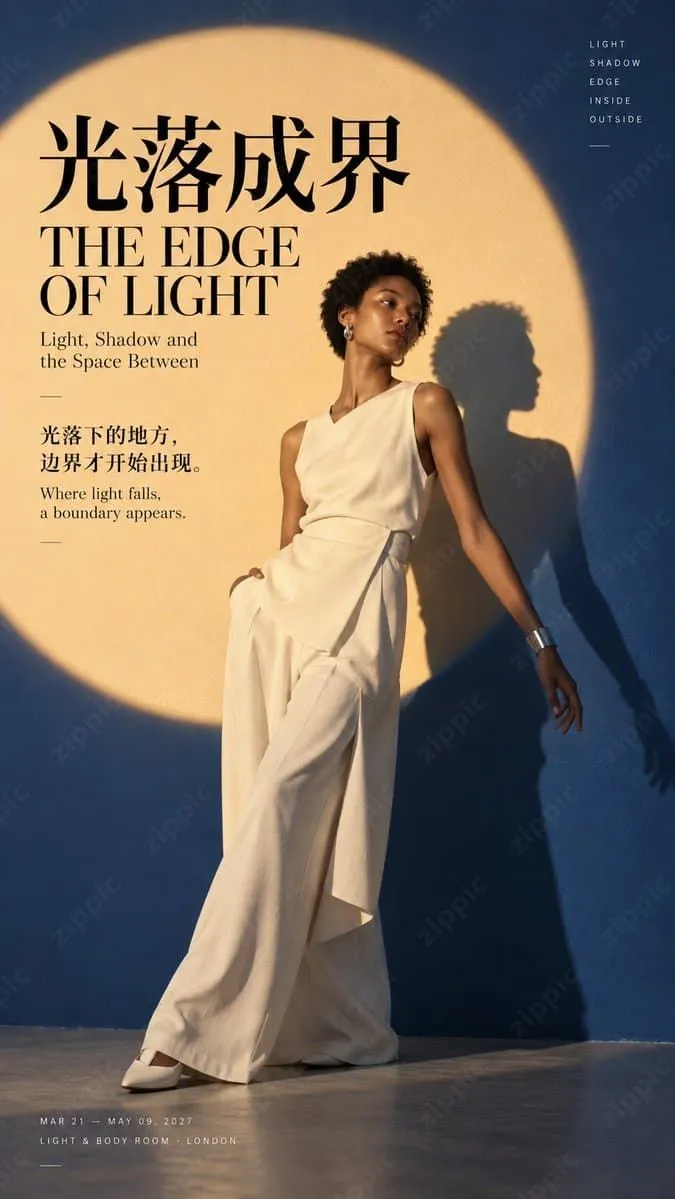
1. 以光為界:圓形光場切分人物與陰影
使用大型圓形光場作為主要構圖邊界,讓主體一半在光中、一半在陰影中,或讓陰影被光場精準切割。這種技巧非常適合表現「邊界」、「內外」與「光影敘事」。它能帶來強烈視覺衝擊,也很適合搭配優雅的留白。
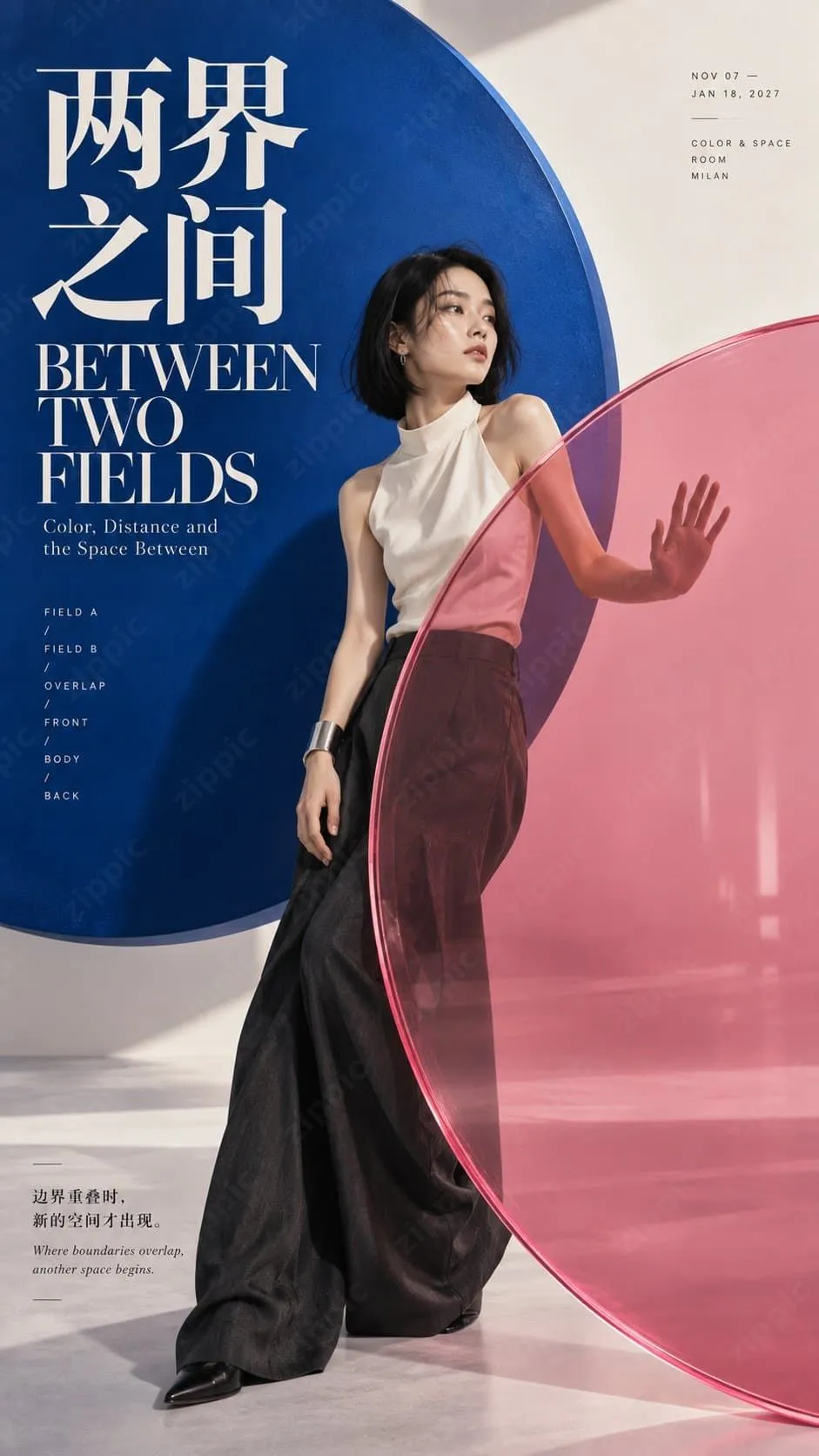
2. 兩個世界之間:半透明雙圓創造空間層次
將兩個半透明彩色圓形放在主體前後,讓它們彼此重疊並與人物互動。人物可以伸手觸碰或穿越半透明圓形,營造出「空間被重新定義」的感覺。色彩對比與透明度是關鍵。
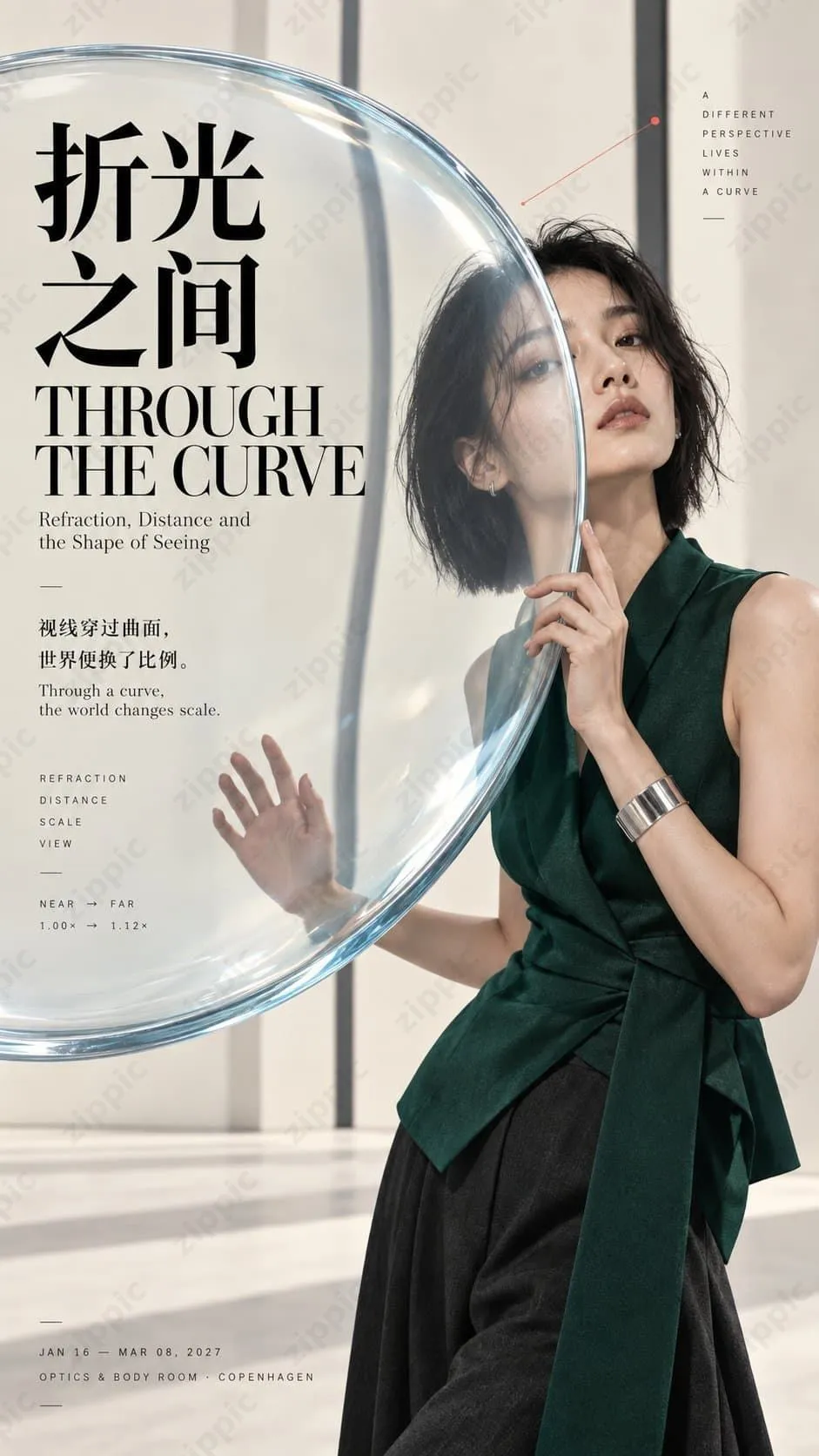
3. 穿越折射:鏡片改變主體的視覺比例
將凸透鏡或光學玻璃元素融入構圖,微妙改變主體某些比例或背景透視。重點是強調真實的物理折射,而不是誇張變形,並維持整體的攝影寫實感。
4. 另一個我:圓形鏡面提供不同視角
使用圓形鏡子或反射表面,從另一個角度呈現主體,或呈現局部倒影。鏡中的反射必須維持主體身份一致,同時透過「雙重視角」創造敘事張力。
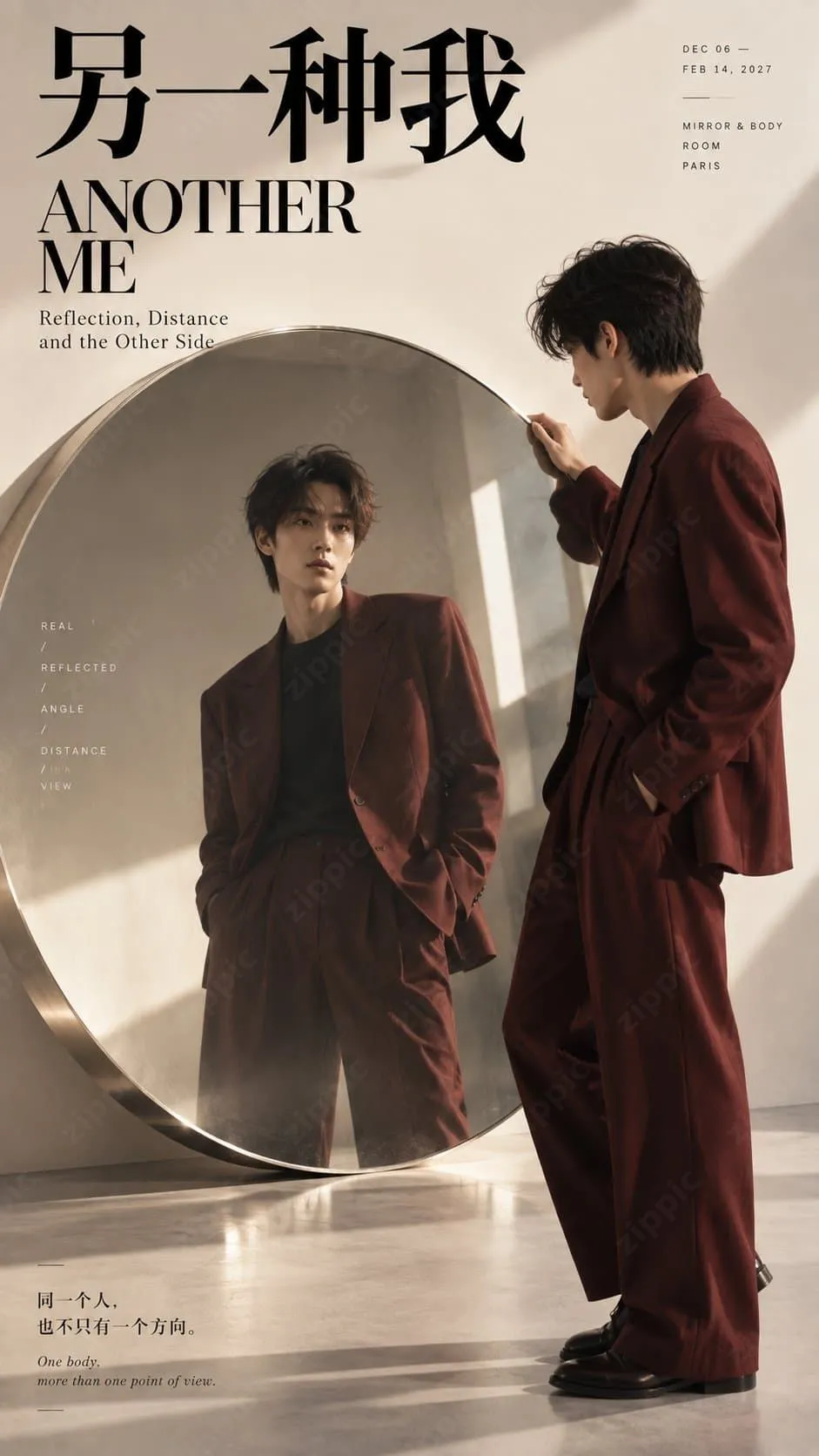
所有這些技巧共同的核心原則是:圓形不是背景裝飾——它是空間的參與者。 主體必須真正進入圓形結構,透過臉部、手部、身體或陰影,與圓形邊緣建立清晰關係。圓內與圓外在色彩、光線、透明度或比例上都應有明確差異。
可直接使用的 Images 2.5 高品質提示詞模板
以下是一套經實測的提示詞框架(專為 9:16 直式人像 Editorial 海報設計):
[Theme]: [Specify theme]
[Subject]: [Gender / Age range / Outfit / Pose]
[Circular Mechanism]: [Circular light field / Translucent double circles / Convex lens / Circular mirror / Other]
[Spatial Alteration]: [Cutting / Color layering / Refraction / Reflection / Magnification / Occlusion]
[Primary Colors]: [Background color + Circle color + Subject accent color]
[Title]: [Chinese / English title]

Generate a 9:16 vertical high-quality Editorial Portrait Poster, with the core composition built on "large-scale circular visual field + spatial interaction with the subject."

The circle must not be merely a decoration behind the subject; it must actively alter the spatial composition: it can cut through the subject and shadow via a circular light field; create new colors and spatial layers through overlapping translucent circles; change the visual proportions of the subject and background via a convex lens; or provide realistic reflections and alternative perspectives through a circular mirror.

The subject must truly enter the circular structure, with the face, hands, body, or shadows intersecting, occluding, refracting, or crossing the circle's boundary. The inside and outside of the circle must show clear differences in color, light, transparency, proportion, or perspective, making it immediately apparent to the viewer that "the circle is transforming the space."

Use a style combining high-end realistic portrait photography + Contemporary Editorial Design + Fashion Magazine Poster. Use clear large color blocks, modern high-contrast Chinese typography, elegant English serif type, and minimal thematic small text, while preserving approximately 20% effective negative space.

All lighting, transparency, refraction, and mirror effects should follow realistic physical principles. The subject's skin, hair, and clothing must appear natural and realistic, without any CGI feel. Transparent materials should be clean and clear, mirror reflections must maintain the identity of the same subject, and lenses should only produce subtle and natural proportional changes.

Even in a thumbnail, it should be immediately readable: subject + large circle + a clear spatial change.

Avoid: a simple circle pasted on a background, a PowerPoint-like feel, tech HUD aesthetics, neon rings, exaggerated distortion, incorrect mirroring, meaningless small text, logos, QR codes, numbering, or copyright marks.
使用建議:
- 先鎖定圓形機制與空間變化,再微調主體與色彩。
- 生成後,檢查縮圖是否能一眼讀懂。
- 多次迭代時,重點放在調整「圓形與主體的互動程度」,而不是添加裝飾元素。
實用技巧:如何提高成功率與專業感
- 優先考慮物理真實感:光線、折射與反射必須符合直覺;否則結果很容易看起來像廉價 CGI。
- 留白與排版同樣重要:約 20% 的有效留白,搭配清晰的中英雙語文字,能大幅提升雜誌封面感。
- 避免塞入過多元素:一個主要圓形機制就足夠;多個圓形可能造成混亂。
- 理想使用情境:人像海報、時尚 Editorial、品牌視覺、雜誌封面,以及藝術展覽主視覺。
- 持續迭代:用同一組提示詞多次生成,挑選互動最自然的圖像再進一步精修。
生成後最佳化圖片大小
AI 生成的高解析度圖片通常會產生較大的檔案大小;若直接上傳到網站、電子書、電商詳情頁或社群媒體,可能會拖慢載入速度。我們建議使用 https://zippic.app 的免費線上圖片壓縮工具。
它完全基於瀏覽器運作,不會將檔案上傳到伺服器,並優先重視隱私。它支援 JPG、PNG、WebP、GIF、AVIF 等多種格式,能在保留品質的同時達到高壓縮率,支援批次處理,透過拖放介面即可簡單使用,且不需要註冊或登入。
結論
圓形構圖不是簡單的裝飾技巧;它是一種透過空間互動提升敘事力與專業度的有效方法。借助 Images 2.5 這類現代 AI 圖像工具,只要掌握「讓圓形真正改變空間」的原則,並結合結構化提示詞,任何人都能快速產出接近商業品質的人像海報。