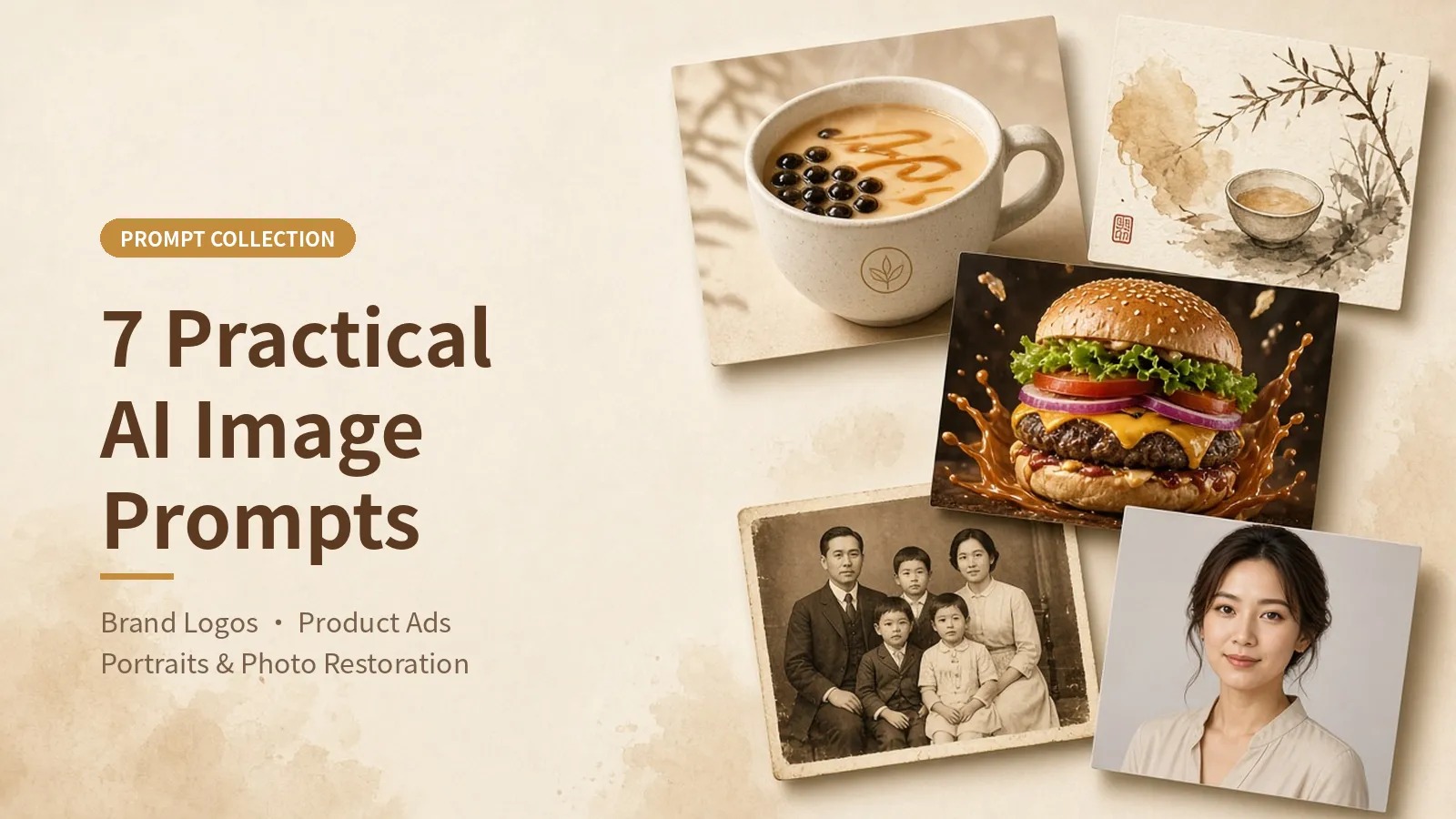
A large portion of popular AI image-generation posts focuses on style experiments. They may look interesting, but are rarely useful in everyday work. The 7 prompts below were all taken from widely shared posts on X over the past month and correspond to specific tasks: creating a brand identity system, shooting product advertisements, designing presentation pages, locking in a character's appearance, restoring old photos, and creating professional portraits. The prompts retain their original wording, with only emojis and hashtags removed.
These prompts can be used with models that support Chinese or reference-image input, including GPT Image, Nano Banana (Gemini), and Doubao. The results may vary between models.
A Complete VI System for a Milk Tea Brand
This prompt comes from a long post with more than 50,000 views. The author used Doubao's “Creative Design” feature to generate a logo, cups, paper bags, and storefront visuals for a fictional milk tea brand.
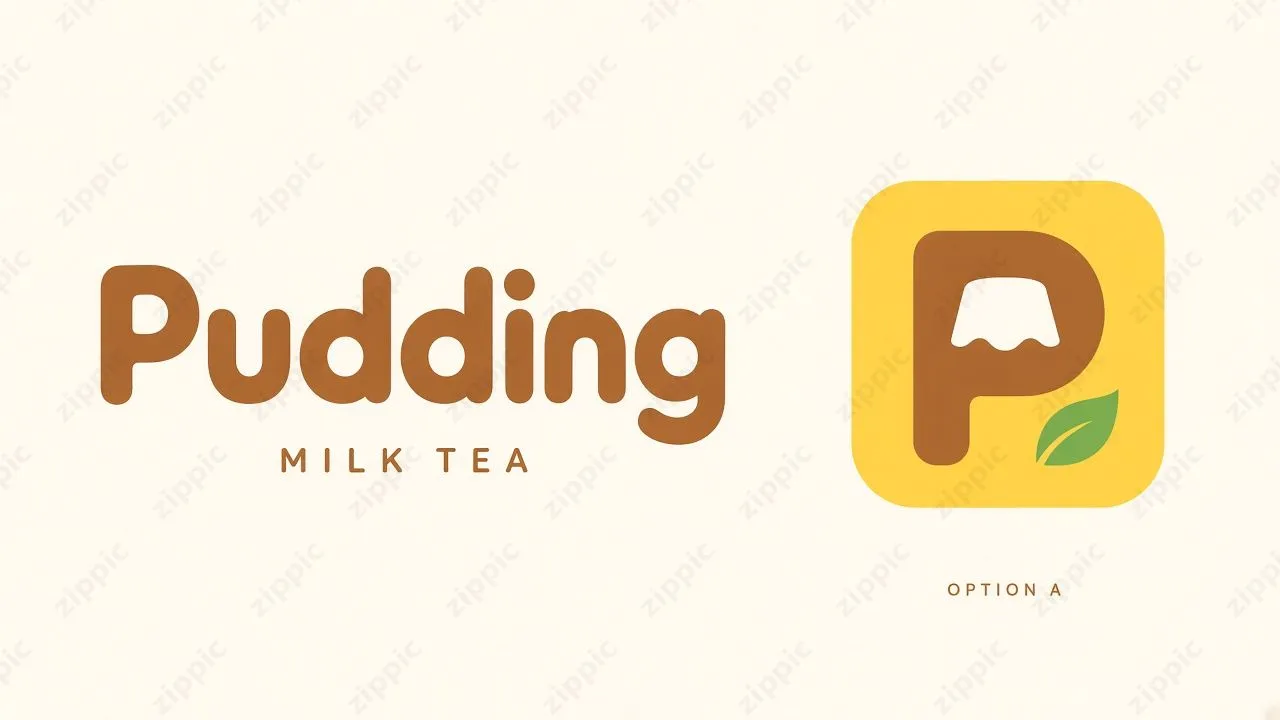
Design a unified brand visual identity for the milk tea brand “Pudding.” The brand personality should be warm, soft, relaxed, clean, design-conscious, and approachable. The brand name must be spelled exactly as “Pudding,” with an uppercase P and all remaining letters lowercase. Use only “MILK TEA” as the English category sublabel.
The color palette is fixed as cream white, pudding yellow, caramel brown, and a small amount of tea-leaf green. Cream white should cover large areas of negative space, pudding yellow should provide the primary brand recognition, caramel brown should be used for the logo and text, and tea-leaf green should appear only as a small accent.
The primary logo should be a rounded, full, custom English Pudding wordmark with consistent stroke weight. The two d's should form a neat repeating rhythm, the letter spacing should be optically corrected, and the outline should remain simple and clear at small sizes. The secondary graphic mark should use the letter P as its structural basis, transforming the inner counter of the P into a simplified upside-down pudding silhouette with a clear negative-space relationship. During application, strictly continue using the selected logo reference image.
The supporting graphics should use broad, soft curves inspired by pudding edges and flowing caramel, with restrained lines and a consistent visual system. The supporting English typeface should be simple, paired with a rounded, clear modern sans-serif Chinese typeface.
Use a clear grid, generous negative space, a small amount of large typography, and realistic materials under natural light to convey the products and usage scenarios of a milk tea shop. Use solid colors in the graphic design, and show appropriate printing and material textures on physical materials. Based on the above, design a complete brand VI system.
The wording of this prompt is similar to a brand requirements document given to a designer. The capitalization of the brand name and the sublabel text are specified character by character, which helps reduce misspelled letters or extra text added by the model. The color section does more than name colors: it defines the role of each one—what should serve as the large-area background color, what should be used for the logo, and what should appear only as a small accent. This helps multiple pieces of brand collateral look like they belong to the same brand. The logo section describes the letterform characteristics and graphic concept—the inner counter of the P becomes an upside-down pudding—without relying on vague adjectives such as “premium” or “minimalist.”
Here are the final generated visuals:
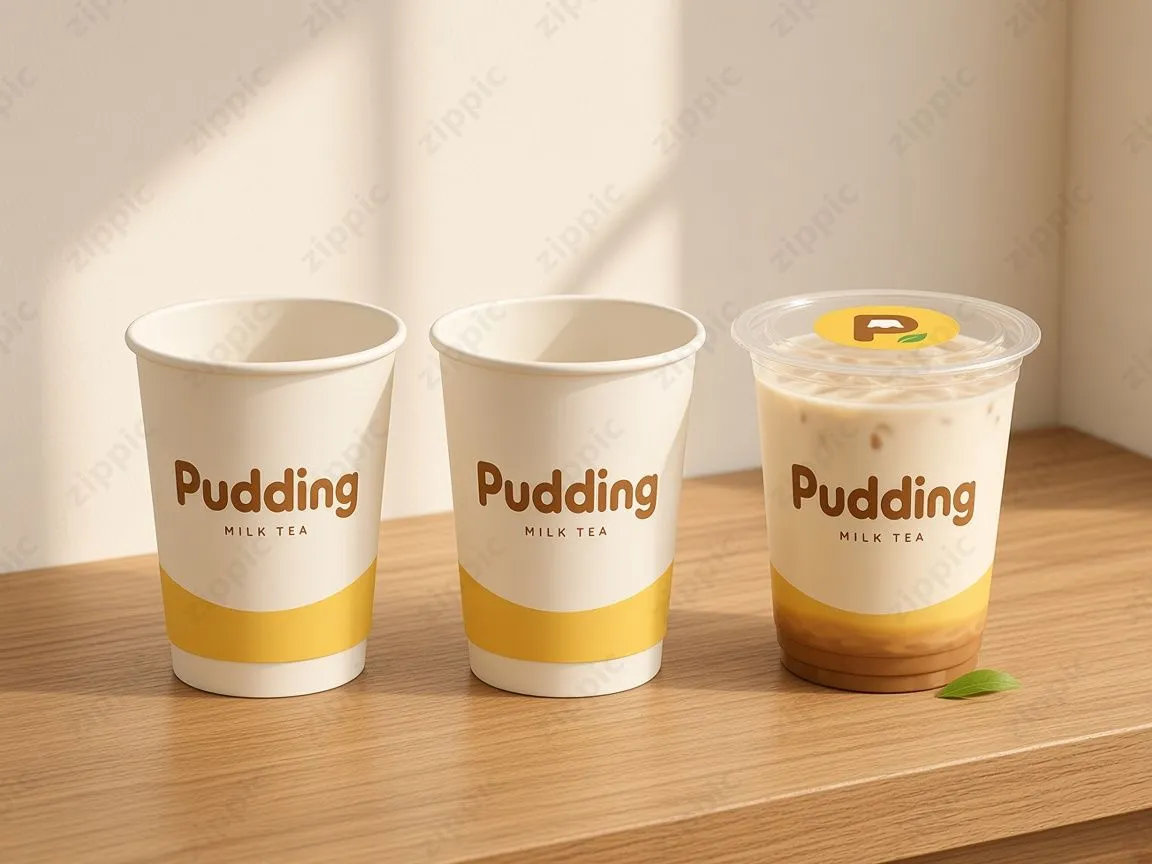
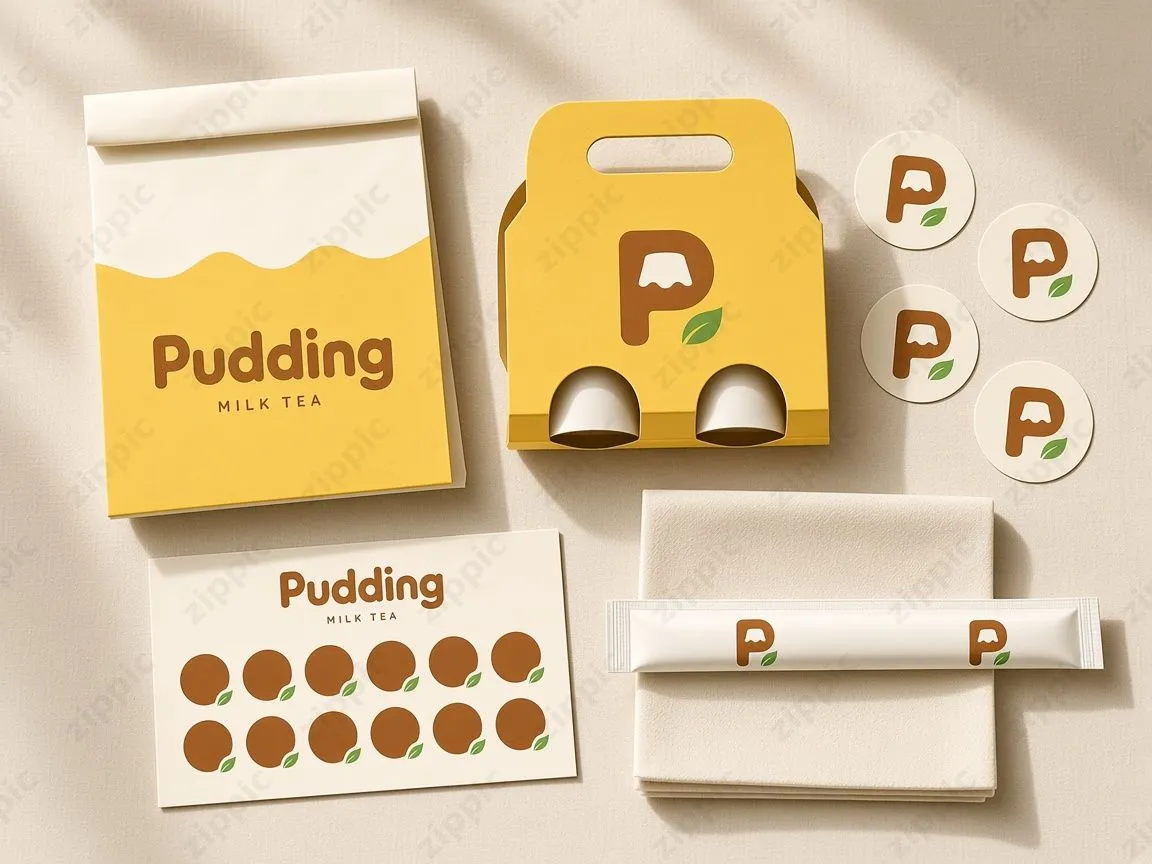
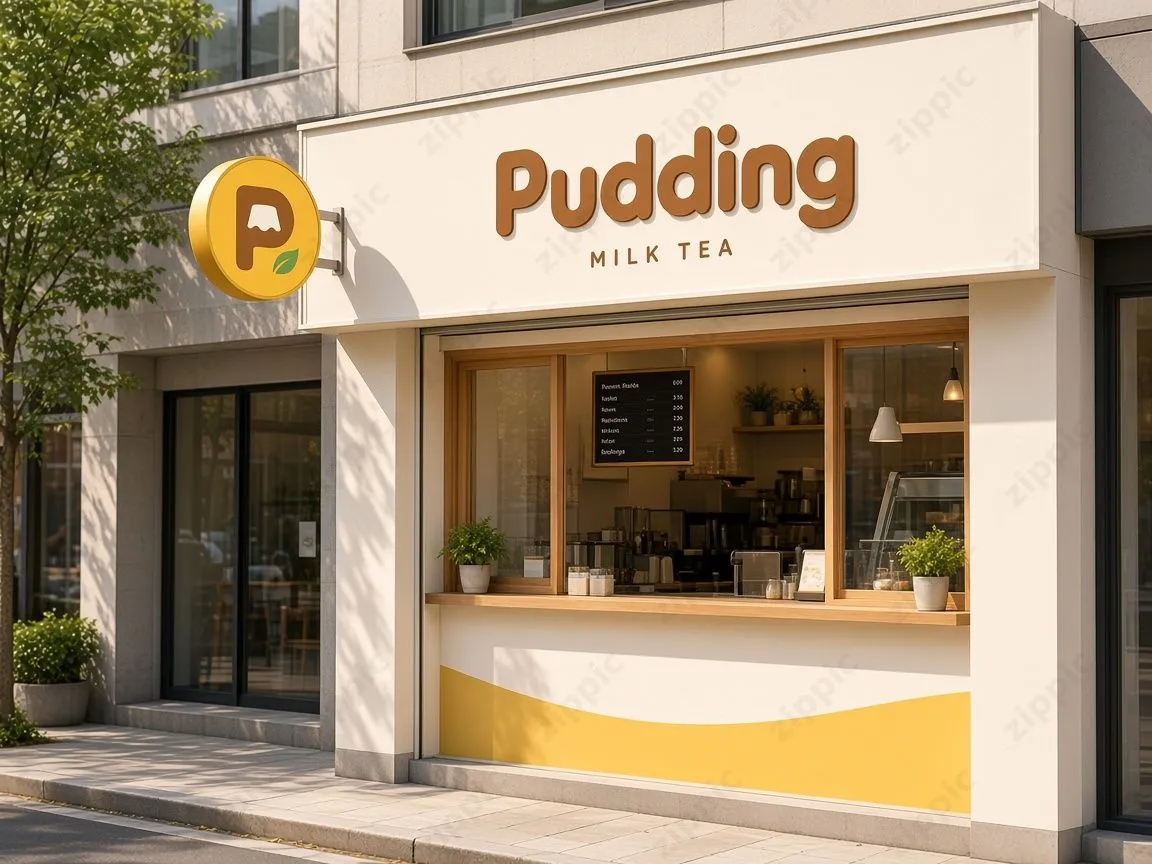
To adapt this prompt for your own brand, replace the brand name, category sublabel, four colors and their roles, and the logo's graphic concept. It is also recommended to keep the sentence “During application, strictly continue using the selected logo reference image.” First select one logo, then have the model extend it across the rest of the brand materials.
Food Advertising Images: Floating Ingredients and Splashing Sauce
This prompt is suitable for advertising hero images for restaurants and food products. Replace the content inside the square brackets.
Premium commercial food advertising photography, with [main dish] naturally placed on a rustic wooden table. The main dish is fully visible in the frame and sharply focused. [Floating ingredients] are suspended above and around the dish, with each piece clearly outlined and separated from the others. A stream of [sauce/liquid] splashes in a controlled arc behind the food, with droplets frozen in midair. The texture should look realistic and appetizing. Directional studio lighting, shallow depth of field, simple and clean composition, ample negative space reserved for advertising copy, high-speed food photography, photorealistic style.
“Keep the main dish fully visible and sharply focused” ensures that the main dish remains complete and clear instead of being obscured by the splashing ingredients.
“Make each piece of food clearly outlined and separated from the others” prevents the suspended ingredients from merging into a single mass.
The most useful instruction for practical applications is “reserve ample negative space for advertising copy.” It encourages the model to leave an empty area in the image where headlines and prices can be added later.
I continued using the Pudding milk tea style above to generate the following visual:
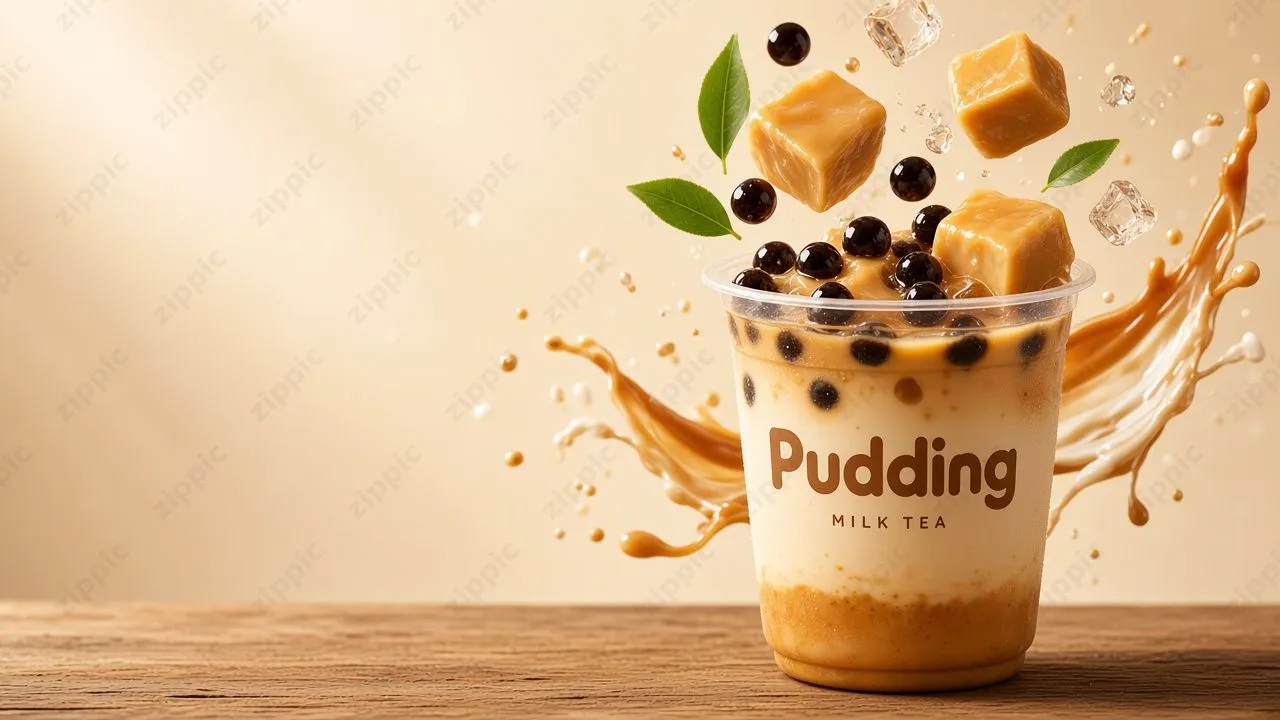
Replace [main dish] with a burger, steak, dessert, or another main item; replace [floating ingredients] with the corresponding ingredients; and replace [sauce/liquid] with sauce, milk, syrup, or another liquid to create a unified series of images.
Creating Presentation Pages and Posters in the Style of a Reference Image
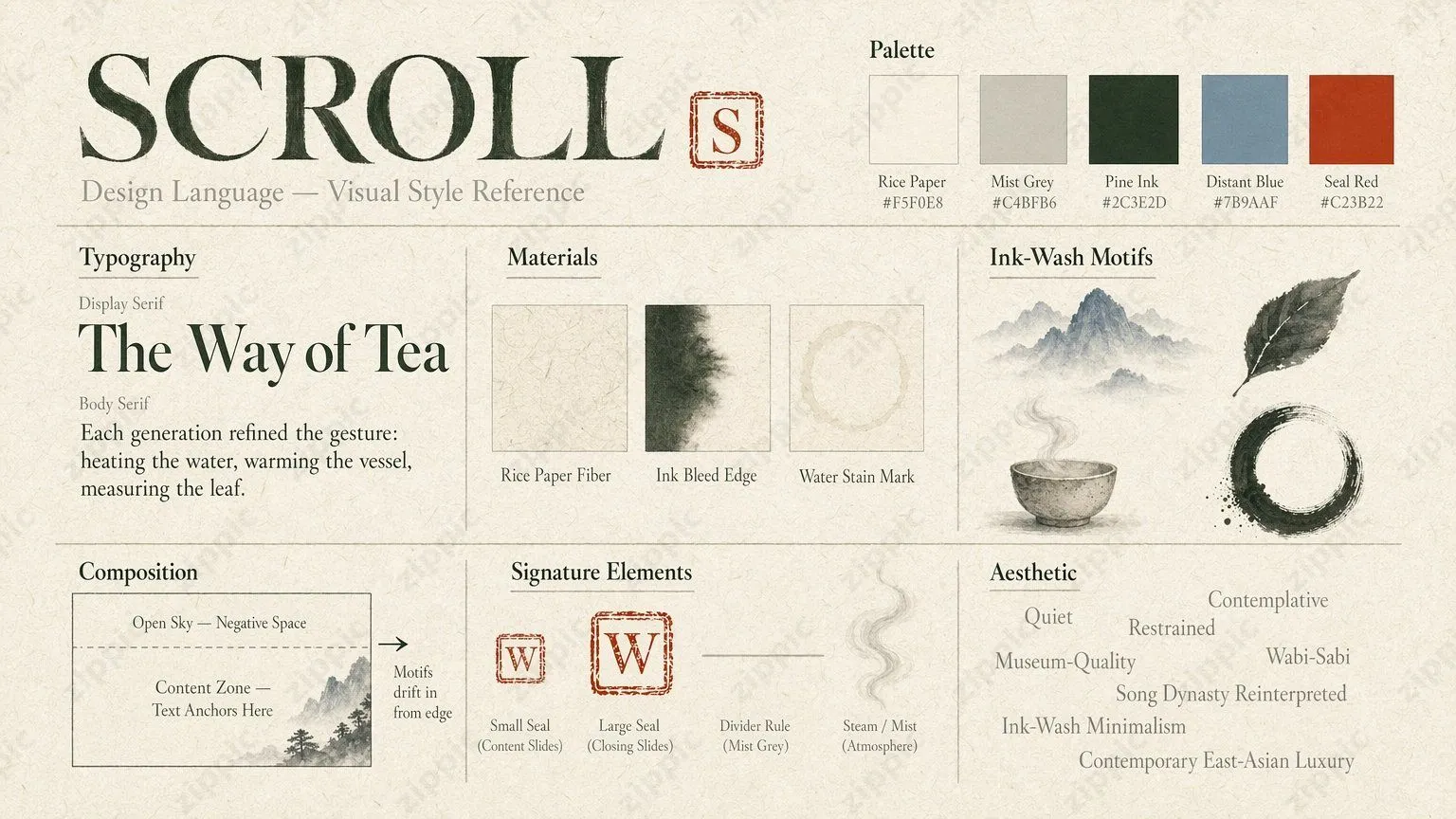
This method, shared by Baoyu, received around 22,000 views. The idea is not to describe the style in words. Instead, prepare a reference image that demonstrates the color palette, typography, paper texture, stamps, and negative-space rules. The prompt only needs to specify the content.
Content prompt:
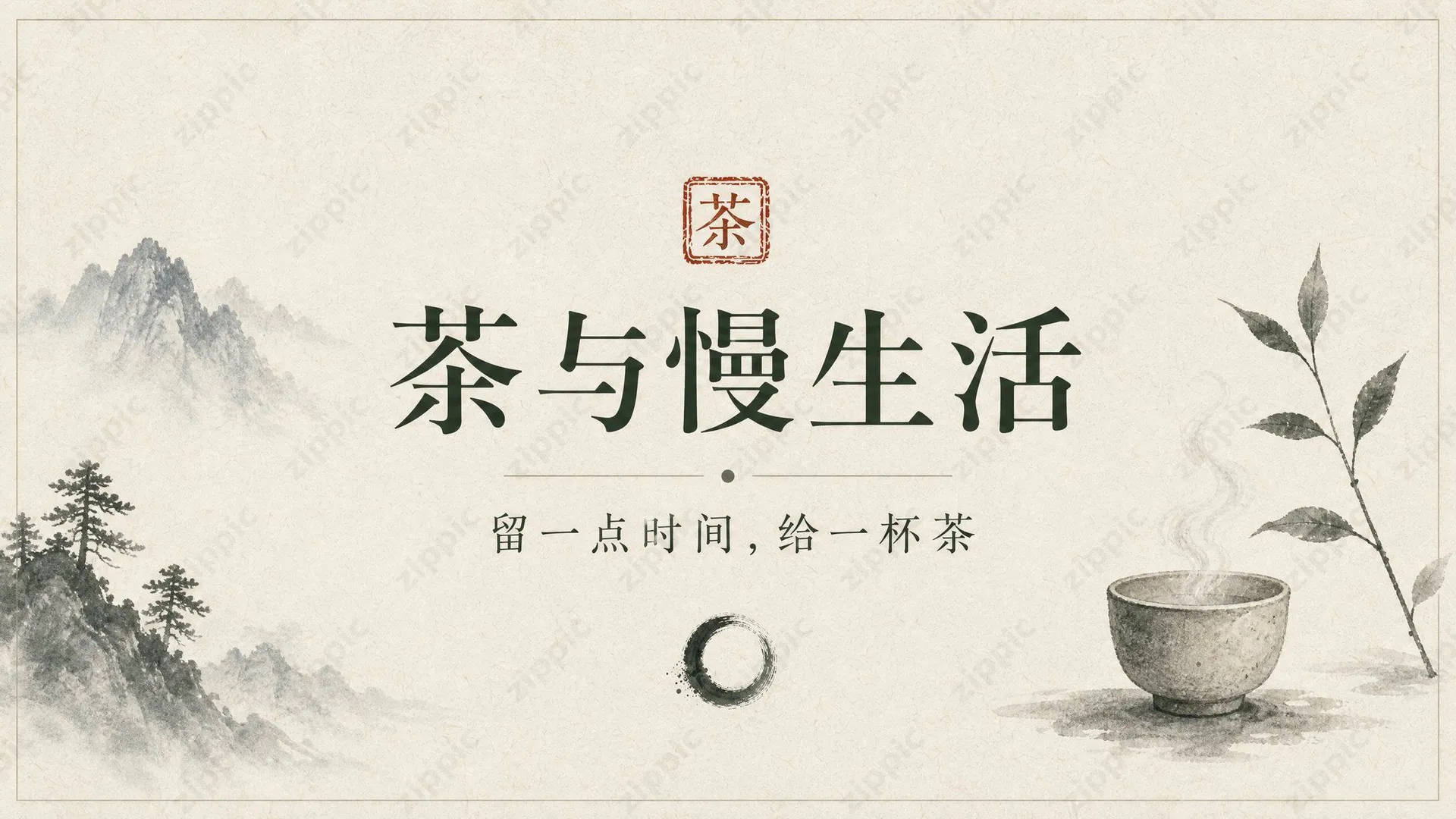
Create a professional presentation slide containing the following:
Title: “Tea and the Slow Life”
Subtitle: “Leave a little time for a cup of tea.” The design must follow the style of the reference image: quiet, restrained, and wabi-sabi, using an ink-wash minimalist style with ink-wash negative space and a xuan paper texture in the background. The text should be centered and clear.

Hierarchy and layout guidelines:
- Begin with the most important narrative elements (the main title / key data), followed by supporting copy presented in clear sections
- Any charts must reflect the actual data provided in the content prompt and faithfully represent the described source
- Arrange images and copy so that viewers can browse from left to right or from top to bottom; avoid stacking charts / images vertically

Visual direction:
- Professional and clean
- If an image of the previous slide is provided, follow its style to maintain visual continuity

Requirements:
- Professional presentation layout with a clear visual hierarchy
- Text must be clear and readable, with appropriate contrast against the background
- Include a title area and content area as needed
- Maintain a consistent style suitable for professional presentations
- High-quality visual design ready for formal publication
- All text should be sharp, clear, and legible
- Place all necessary text safely within the frame; avoid placing text directly at the edges
- Balance visual elements and negative space so the composition is clean without feeling crowded
The reference image determines the style, while the template provides the layout rules. For each slide, only the content in the middle needs to be replaced. The content prompt on the second page of the original post also added “follow the style of the first page and the reference image,” using the already generated first page as an additional reference to maintain consistency across multiple pages. The same method works for Xiaohongshu image-and-text posts, WeChat Official Account covers, and event posters: define a set of visual standards once in a reference image, then keep the prompts short when generating subsequent images.
Character Design Sheet: Locking in the Same Face
When creating a series of content pieces, one of the most common problems is that the same character looks different across images. This prompt, shared by EvoLink in a post with around 30,000 views, uses a single reference photo to generate a complete character design sheet, including multiple angles, full-body views, expressions, and close-ups of facial features. All subsequent image generations use this design sheet as a reference. The original was long and arranged line by line; here, the list has only been merged into comma-separated text, with no content removed or changed.
Important note—identity lock:
The uploaded reference image is the definitive identity reference. The person in the entire character design sheet must be reproduced as exactly the same individual. Do not redesign, beautify, reinterpret, or replace the character.
Preserve as accurately as possible: the person's original facial features, facial bone structure and proportions, eyes, eye shape and iris color, eyebrows and natural brow shape, nose shape and proportions, lips, mouth shape and fullness, cheeks, jawline and chin, skin tone and natural skin texture, perceived age, hairline, exact hair color, hair length, hair texture and hairstyle, body proportions and posture, and distinctive facial identifying features.

Character design sheet layout:
Generate a clean, professional reference board containing: a large frontal portrait / facial close-up, front view, left three-quarter view, right three-quarter view, left profile, right profile, back view, full-body front view, full-body three-quarter view, full-body side view, full-body back view, neutral expression, natural smile, soft smile, gaze directed to the left, gaze directed to the right, eye close-up, eyebrow close-up, nose close-up, lip close-up, hair close-up, accessory close-up, clothing reference, color swatch / skin tone reference.

Consistency requirements:
Every panel must depict the same person. Across all angles, poses, and expressions, the facial features, facial proportions, hairstyle, skin tone, and body characteristics must remain consistent. For views that cannot be directly seen in the reference image, reconstruct them reasonably while remaining strictly faithful to the visible features in the original image. Do not invent prominent new features.

Presentation requirements:
A high-end professional film-project character handbook / modeling reference sheet. Clean and concise layout. Neutral studio background. Soft, realistic studio lighting. Sharp, clear facial details. Preserve natural pores and skin texture. Individual hair strands should be clearly defined. Fabric and accessory textures should look realistic. Accurate human anatomy. Consistent camera perspective. Separate each panel with clean, thin borders. Add professional annotation text below each view. Minimalist, elegant typography. The polished quality of a high-end fashion model reference editorial.

Realism requirements:
Ultra-realistic photographic quality. Real human appearance. Natural skin texture. Realistic eyes. Physically accurate hair. Natural shadows. Realistic, natural proportions. No CGI look, no plastic-looking skin, no doll-like face, no AI beauty filter or face swap.

Negative prompt:
Character replacement, facial changes, facial deformation, identity drift, altered facial structure, different eyes, different nose, different lips, altered jawline, inconsistent skin tone, altered hairstyle, inconsistent body proportions, duplicated person, distorted structure, asymmetrical face, plastic skin, waxy skin, CGI, 3D rendering, cartoon, anime, illustration, excessive beautification, heavy makeup, unrealistic eyes, blurry face, missing details, extra fingers, missing fingers, deformed hands, broken human anatomy.

Output requirements:
Output one complete, richly detailed professional [character consistency sheet], integrated into a single image and usable as the primary reference image for continuously generating images and videos of this character.
Most of this prompt is devoted to specifying what must be preserved. Facial features, hairline, skin tone, and body type are listed one by one, while beautification and redesign are explicitly prohibited. This is the key to maintaining a stable appearance. For angles that are not visible in the reference photo, such as the back view, the prompt asks the model to “complete them while remaining faithful to the visible features and without adding obvious new traits,” preventing it from inventing details such as moles or tattoos.
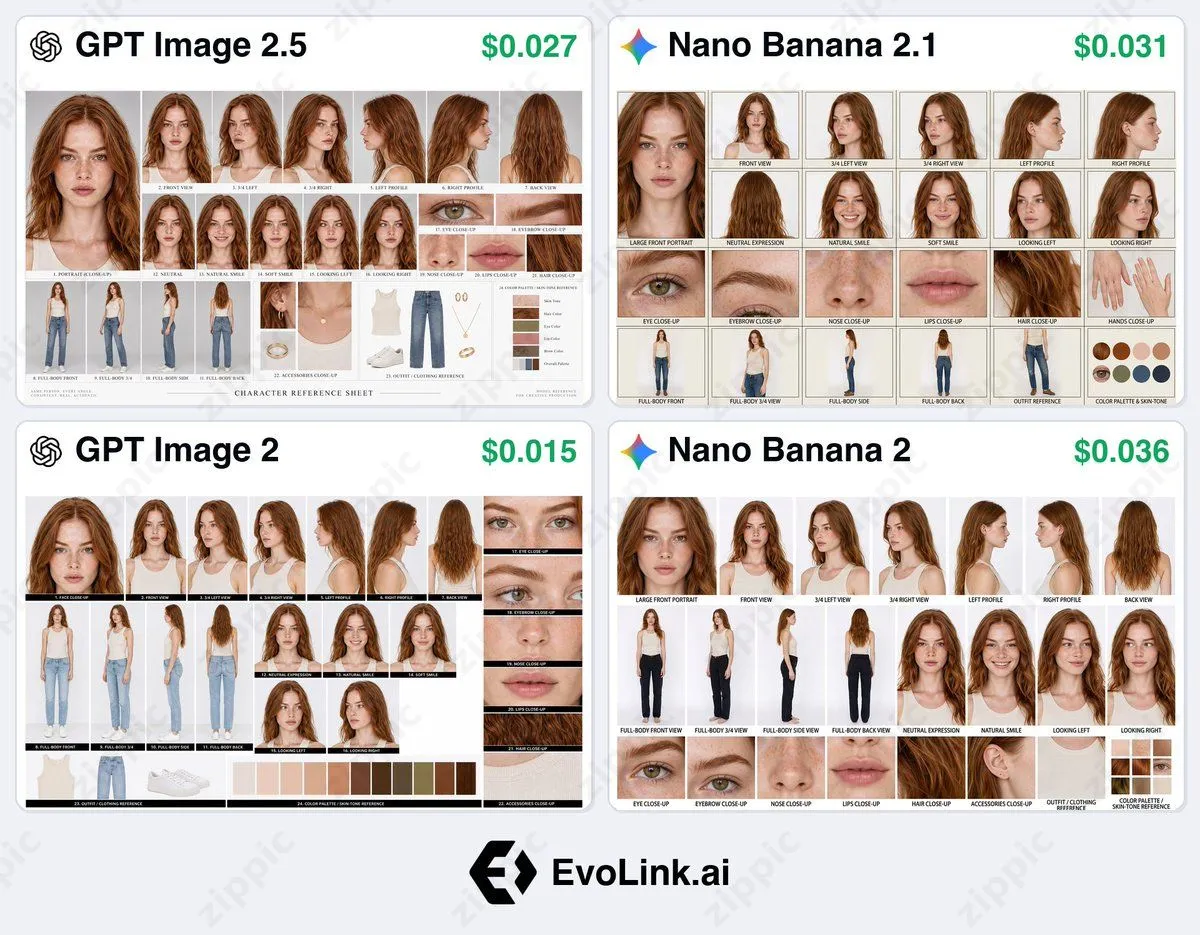
This design sheet serves as a fixed reference for subsequent image generation. When creating a brand ambassador, a series of illustrations, or a short-video character, uploading the design sheet with every generation is less likely to cause appearance drift than repeatedly modifying the same image. When using real-person photos, use only photos of yourself or photos for which you have obtained authorization.
Turning a Photo into a Vintage Editorial-Style Poster
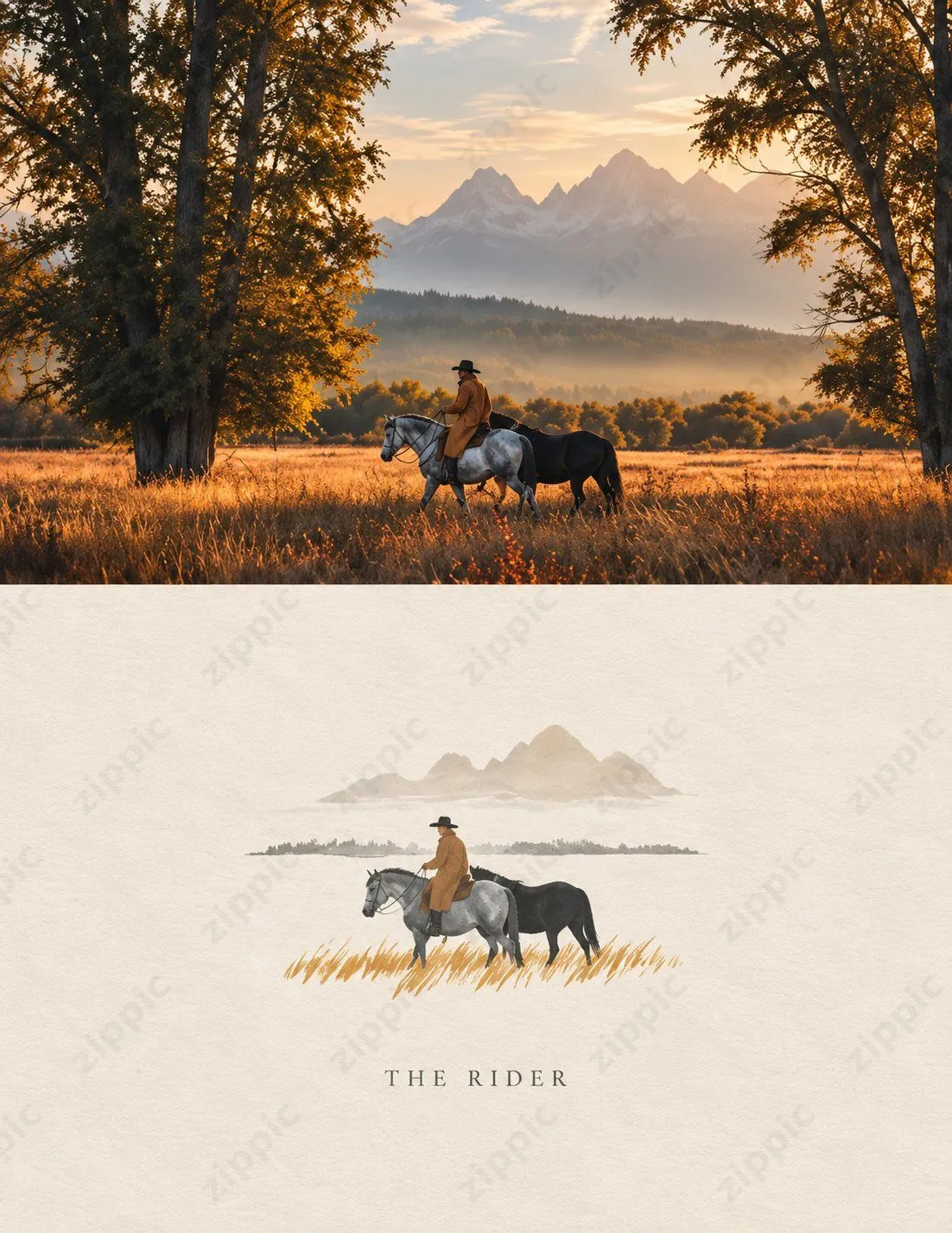
This post received around 19,000 views and more than 350 saves. The upper half of the image is realistic photography, while the lower half transforms the same scene into a watercolor-and-ink illustration, with a line of serif title text at the bottom. It is suitable for turning travel photos into social-media visuals.
Use the uploaded photo as the primary visual reference. Create a striking vintage fine-art editorial composition while strictly preserving the original scene: a lone rider wearing a dark denim hat and a warm brown coat, riding a gray horse through a golden grassland, with a black horse walking beside him. Preserve the original composition, subject positions, horses, rider, mountains, trees, and overall atmosphere.

Top section: ultra-realistic cinematic photography, warm golden-hour sunlight, autumn trees framing both sides of the image, a misty mountain valley, majestic snow-capped mountains in the background, glowing golden blades of grass, soft atmospheric haze, natural shadows, realistic textures, subtle vintage film grain, nostalgic Western photography, refined magazine aesthetics.

Bottom section: transform the same scene into a delicate vintage hand-painted watercolor and ink illustration on warm ivory textured paper. Preserve the recognizability of the rider, gray horse, black horse, mountains, and grassland, but simplify them with elegant brushwork. Use a soft earth-tone palette with subtle watercolor washes, handmade paper texture, and minimalist luxury editorial design.

Add the elegant serif text “THE RIDER” centered at the bottom.

Clean, symmetrical composition, refined vintage aesthetics, cinematic storytelling, a fusion of fine-art photography and hand-painted illustration, high detail, soft natural colors, no Instagram interface, no logos, no watermark, vertical 4:5 composition.
The original prompt was designed for a photo of a horseback rider, so the first paragraph directly restated the contents of the photo. When adapting it for your own image, revise the scene descriptions in the first paragraph and the Top section to match the people, objects, and environment in your photo. The illustration requirements in the Bottom section and the layout requirements in the final paragraph can remain unchanged. Restating the photo's contents first tells the model which elements must be preserved during the transformation, helping the illustration in the lower half correspond to the photo in the upper half. It is recommended to keep the title to one or two English words; the shorter the text, the lower the probability of spelling errors.
Old Photo Restoration and Professional Portraits
The following two prompts come from the same post, which compiled 10 Chinese prompts for editing photos with ChatGPT. These two have the clearest use cases.
Old photo restoration:
Restore my uploaded photo into a modern, professional portrait. Preserve my real face and natural facial features while improving the lighting, composition, clarity, skin details, exposure, background, and overall image quality. Make this old photo look as though it were taken today with a professional camera and a high-end portrait lens.
Professional portrait:
Turn my uploaded photo into a professional portrait suitable for LinkedIn, a company website, or a personal brand. Preserve my natural, recognizable face, face shape, skin tone, hairstyle, and identity. Use clean, professional lighting, realistic skin texture, a natural expression, slight background separation, clear facial details, and carefully considered composition. It should look like a real portrait taken by a professional photographer with a high-end camera.
Both prompts first state what to “preserve” and then what to “improve.” When restoring an old photo, the model can easily turn the person's face into someone else. The sentence “Preserve my real face and natural facial features” should not be omitted. When restoring a photo of an older family member, you can replace “my” with “the person in the photo” and add features that must be preserved, such as glasses, hairstyle, or moles. For the professional portrait prompt, you can also specify the background color and clothing—for example, “a solid light-gray background and a dark suit jacket”—to produce a result closer to a practically usable profile image.
AI-generated professional portraits are suitable only for social-media and website profile images. They must not be used as ID photos or for applications such as exams and visas that require a real photograph.
What These Prompts Have in Common
These prompts share several writing patterns. For prompts involving reference images, they first state which elements must remain unchanged and then describe what should be altered. When describing the image, they rely more on specific color roles, camera and lighting details, and element placement, and less on abstract adjectives. When text will be added later, the prompt directly requests a blank area. When the style requirements are complex, using a reference image instead of a long list of descriptions is often more stable than adding more adjectives.
Generated originals are usually several MB in size. Before sending them to friends or uploading them to your own website, you can compress them with zippic to save bandwidth and storage space.
Sources
- Designing a milk tea brand VI with Doubao, @liyue_ai: https://x.com/liyue_ai/status/2108498310893814136
- Food advertising image with floating ingredients, @azed_ai: https://x.com/azed_ai/status/2105251333037342846
- Presentation-page prompt for controlling style with a reference image, @dotey: https://x.com/dotey/status/2105775463624810788
- Character consistency design sheet (main post), @EvoLinkAi: https://x.com/EvoLinkAi/status/2108218362090406080
- Character consistency design sheet (full prompt), @EvoLinkAi: https://x.com/EvoLinkAi/status/2108218363659096102
- Photo-to-vintage editorial-style poster (main post), @Alina_with_Ai: https://x.com/Alina_with_Ai/status/2106930091779580206
- Photo-to-vintage editorial-style poster (full prompt), @Alina_with_Ai: https://x.com/Alina_with_Ai/status/2106930095403467073
- 10 ChatGPT prompts for photo editing, @shanyanggm: https://x.com/shanyanggm/status/2109297332361834701