How to Create Advanced Portrait Posters with AI: A Complete Guide to Circular Framing Techniques (Images 2.5 Prompt Practice)
As AI image generation tools grow increasingly sophisticated, portrait posters are no longer limited to simple "person + background" compositions. What truly makes a work stand out is the attention given to composition—especially circular framing. It naturally guides the viewer's eye, creates spatial depth, and lends the image a sense of elegance and professionalism.
This article systematically breaks down how to make circular elements genuinely "participate" in composition, rather than just being pasted onto the background, using real-world examples from AI visual creator @MrLarus and their work with Images 2.5. It is designed for fashion designers, brand visual artists, content creators, and AI prompt learners, with the goal of helping you quickly produce high-quality work suitable for magazine covers, brand posters, and Editorial-style visuals.
Why Is Circular Framing So Well-Suited for Portrait Posters?
Circles possess a naturally strong visual cohesion. When they interact with a subject through intersection, support, embedding, refraction, or reflection, the image instantly gains depth and narrative potential. Compared to conventional rectangular compositions, circles make it easier to create a contrast between "inside and outside the boundary," making the core subject instantly memorable.
A common pitfall is treating the circle as mere decoration—drawing a large circle in the background and placing the person randomly inside. The truly advanced approach is to have the circle alter the spatial relationship: a light field cutting through shadows, translucent circles layering color, lenses changing proportions, or mirrors bringing in new perspectives.
Four Core Circular Composition Techniques
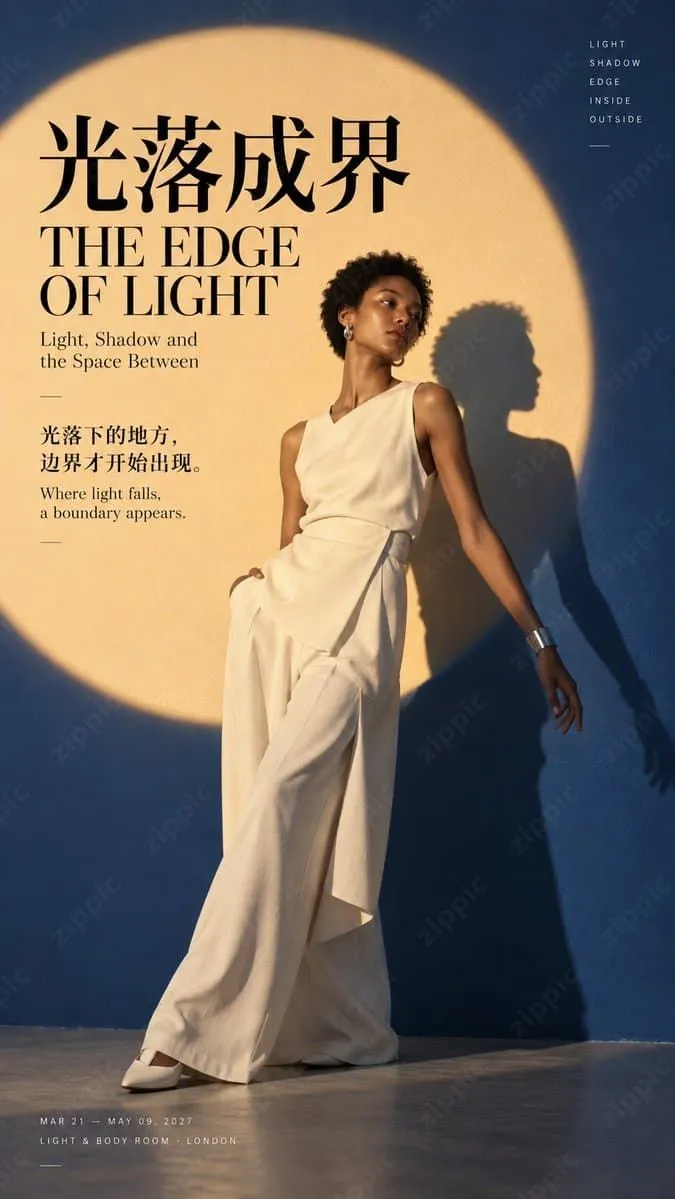
1. Light as a Boundary: A Circular Light Field Splitting Figure and Shadow
Use a large circular light field as the primary compositional boundary, placing the subject half in light, half in shadow, or having the shadow precisely cut by the light field. This technique is ideal for conveying "boundaries," "inside/outside," and "light-and-shadow narratives." It delivers strong visual impact and pairs well with elegant negative space.
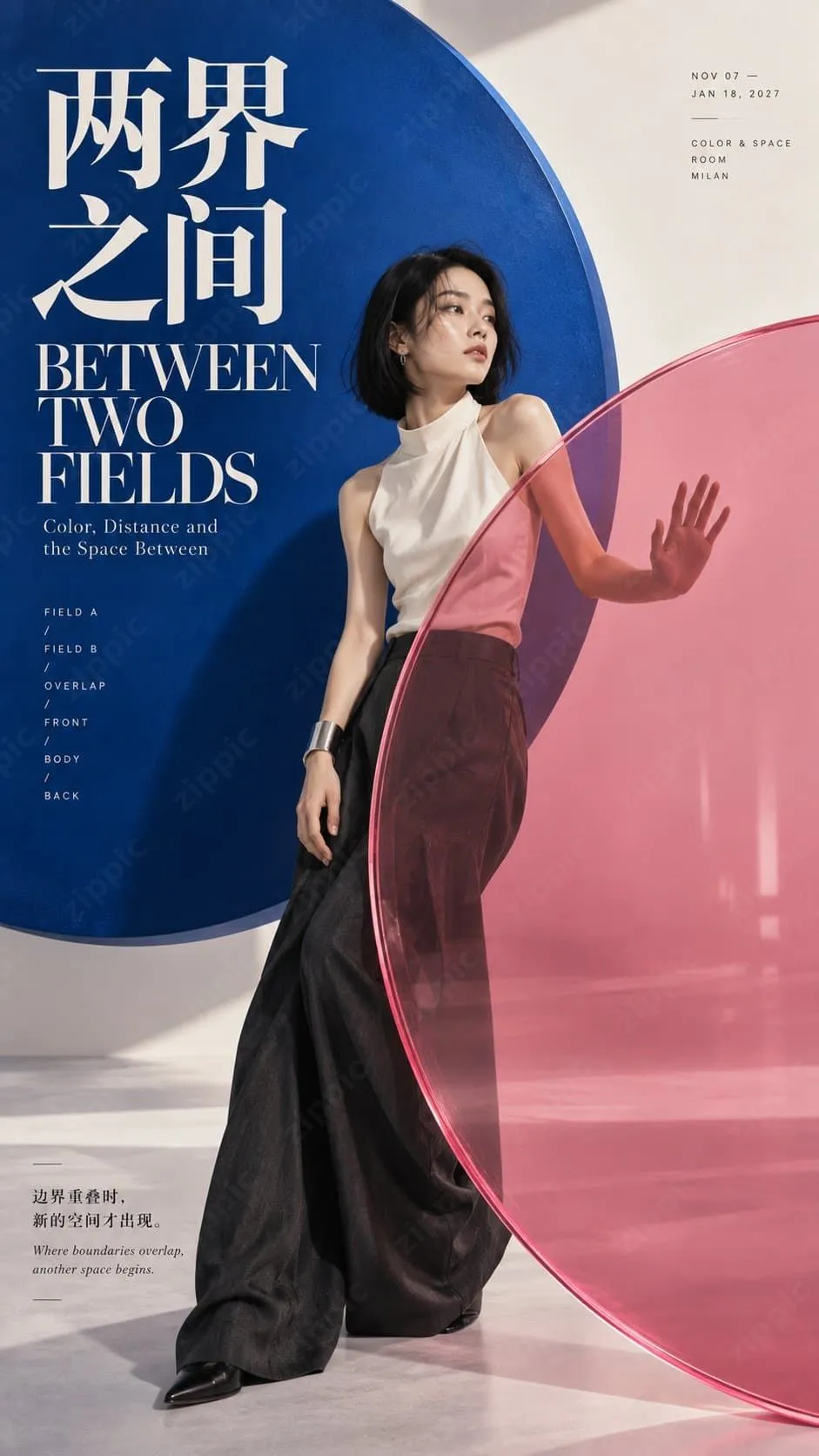
2. Between Two Worlds: Translucent Double Circles Creating Spatial Layers
Place two semi-transparent colored circles in front and behind the subject, allowing them to overlap and interact with the figure. The person can reach out to touch or pass through the translucent circles, creating a sense of "redefined space." Color contrast and transparency are key.
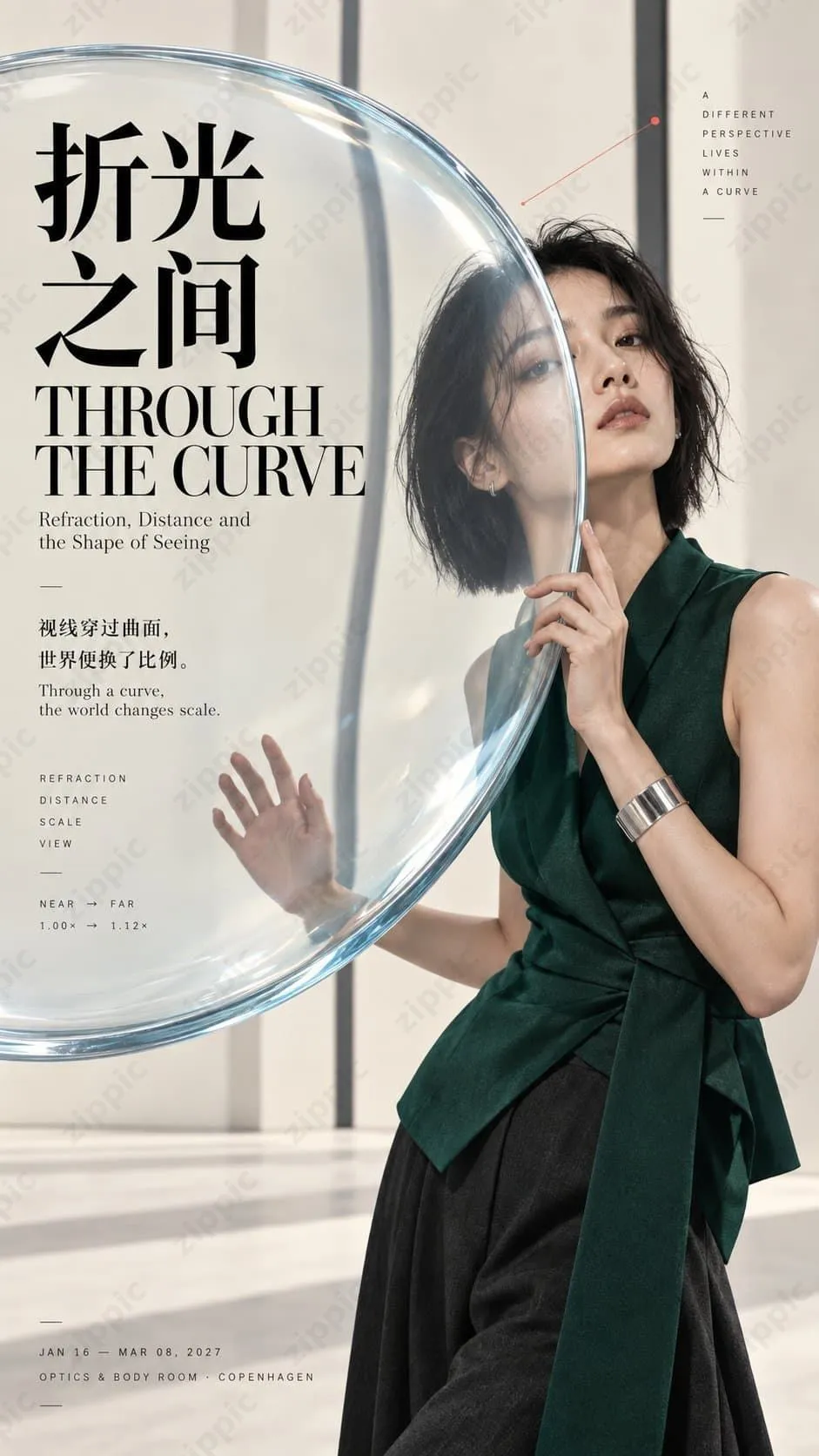
3. Through Refraction: Lenses Altering the Visual Proportions of the Subject
Incorporate convex lenses or optical glass elements into the composition, subtly altering certain proportions of the subject or the background perspective. Emphasize realistic physical refraction rather than exaggerated distortion, maintaining an overall photographic realism.
4. Another Me: A Circular Mirror Offering a Different Perspective
Use a circular mirror or reflective surface to show the subject from another angle or as a partial reflection. The mirror's reflection must maintain the identity of the subject while creating narrative tension through a "dual perspective."
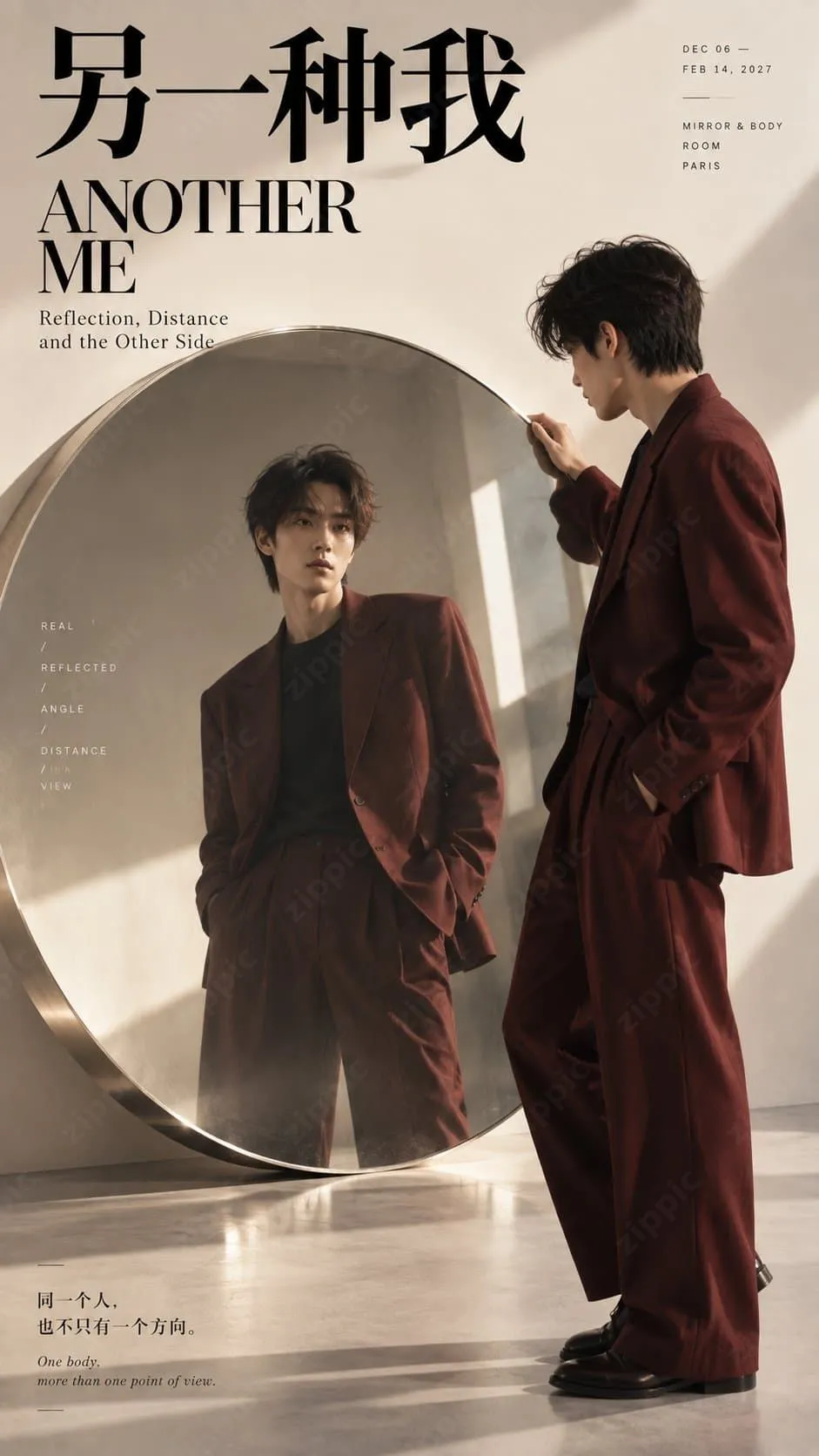
The core principle shared by all these techniques is: the circle is not a background embellishment—it is a participant in the space. The subject must genuinely enter the circular structure, with the face, hands, body, or shadows establishing a clear relationship with the circle's edge. There should be a distinct difference between inside and outside the circle in terms of color, light, transparency, or proportion.
Ready-to-Use Images 2.5 High-Quality Prompt Template
Below is a field-tested prompt framework (designed for vertical 9:16 portrait Editorial posters):
[Theme]: [Specify theme]
[Subject]: [Gender / Age range / Outfit / Pose]
[Circular Mechanism]: [Circular light field / Translucent double circles / Convex lens / Circular mirror / Other]
[Spatial Alteration]: [Cutting / Color layering / Refraction / Reflection / Magnification / Occlusion]
[Primary Colors]: [Background color + Circle color + Subject accent color]
[Title]: [Chinese / English title]

Generate a 9:16 vertical high-quality Editorial Portrait Poster, with the core composition built on "large-scale circular visual field + spatial interaction with the subject."

The circle must not be merely a decoration behind the subject; it must actively alter the spatial composition: it can cut through the subject and shadow via a circular light field; create new colors and spatial layers through overlapping translucent circles; change the visual proportions of the subject and background via a convex lens; or provide realistic reflections and alternative perspectives through a circular mirror.

The subject must truly enter the circular structure, with the face, hands, body, or shadows intersecting, occluding, refracting, or crossing the circle's boundary. The inside and outside of the circle must show clear differences in color, light, transparency, proportion, or perspective, making it immediately apparent to the viewer that "the circle is transforming the space."

Use a style combining high-end realistic portrait photography + Contemporary Editorial Design + Fashion Magazine Poster. Use clear large color blocks, modern high-contrast Chinese typography, elegant English serif type, and minimal thematic small text, while preserving approximately 20% effective negative space.

All lighting, transparency, refraction, and mirror effects should follow realistic physical principles. The subject's skin, hair, and clothing must appear natural and realistic, without any CGI feel. Transparent materials should be clean and clear, mirror reflections must maintain the identity of the same subject, and lenses should only produce subtle and natural proportional changes.

Even in a thumbnail, it should be immediately readable: subject + large circle + a clear spatial change.

Avoid: a simple circle pasted on a background, a PowerPoint-like feel, tech HUD aesthetics, neon rings, exaggerated distortion, incorrect mirroring, meaningless small text, logos, QR codes, numbering, or copyright marks.
Usage Suggestions:
- Lock in the circular mechanism and spatial alteration first, then fine-tune the subject and colors.
- After generating, check whether the thumbnail is instantly readable.
- During multiple iterations, focus on adjusting "the degree of interaction between the circle and the subject," rather than adding decorative elements.
Practical Tips: How to Improve Success Rate and Professionalism
- Prioritize physical realism: Lighting, refraction, and reflection must feel intuitive; otherwise, the result can easily look like cheap CGI.
- Negative space and typography are equally important: About 20% effective negative space combined with clear bilingual (Chinese/English) text greatly enhances the magazine-cover feel.
- Avoid over-stuffing: One primary circular mechanism is enough; multiple circles can create confusion.
- Ideal use cases: Portrait posters, fashion Editorials, brand visuals, magazine covers, and key art for art exhibitions.
- Keep iterating: Run the same prompt multiple times and select the image with the most natural interaction for further refinement.
Optimize Image Size After Generation
AI-generated high-resolution images often result in large file sizes, which can slow down loading times when uploaded directly to websites, e-books, e-commerce detail pages, or social media. We recommend using the free online image compression tool at https://zippic.app.
It is fully browser-based, doesn't upload files to a server, and prioritizes privacy. It supports JPG, PNG, WebP, GIF, AVIF, and more formats, achieves high compression rates while preserving quality, allows batch processing, is simple to use with a drag-and-drop interface, and requires no registration or login.
Conclusion
Circular framing is not a simple decorative trick; it is an effective method to elevate narrative power and professionalism through spatial interaction. With modern AI image tools like Images 2.5, as long as you master the principle of "letting the circle genuinely transform the space" and combine it with structured prompts, anyone can quickly produce portrait posters approaching commercial quality.