How to Generate High-End Character Posters with AI: A Complete Guide to Circular Framing Composition Techniques (Images 2.5 Prompting in Practice)
As AI image-generation tools continue to mature, character posters are no longer limited to a simple “character + background” formula. Works that truly stand out often make careful use of composition—especially circular framing. It naturally guides the viewer’s eye, creates a sense of spatial depth, and gives the image a more elegant and professional appearance.
Based on the Images 2.5 case studies shared by AI visual creator @MrLarus, this article systematically breaks down how to make circular elements genuinely “participate” in the composition rather than simply placing them on the background. It is suitable for fashion designers, brand visual teams, content creators, and AI prompt learners. The goal is to help you quickly produce high-quality works suitable for magazine covers, brand posters, and Editorial-style designs.
Why Is Circular Framing Especially Suitable for Character Posters?
Circles possess a strong visual sense of cohesion. When they interact with a character through overlap, support, embedding, refraction, or reflection, the image immediately gains depth and narrative quality. Compared with ordinary rectangular compositions, circles make it easier to create a contrast between “inside and outside the boundary,” helping viewers remember the central subject at a glance.
A common failed approach is for the “circle to be merely decorative”—drawing a large circle in the background and casually placing the character in the center. The truly sophisticated approach is to let the circle change the spatial relationships: a light field cuts through a shadow, transparent circles create layered color, a lens alters proportions, and a circular mirror introduces a new perspective.
Four Core Circular Composition Techniques
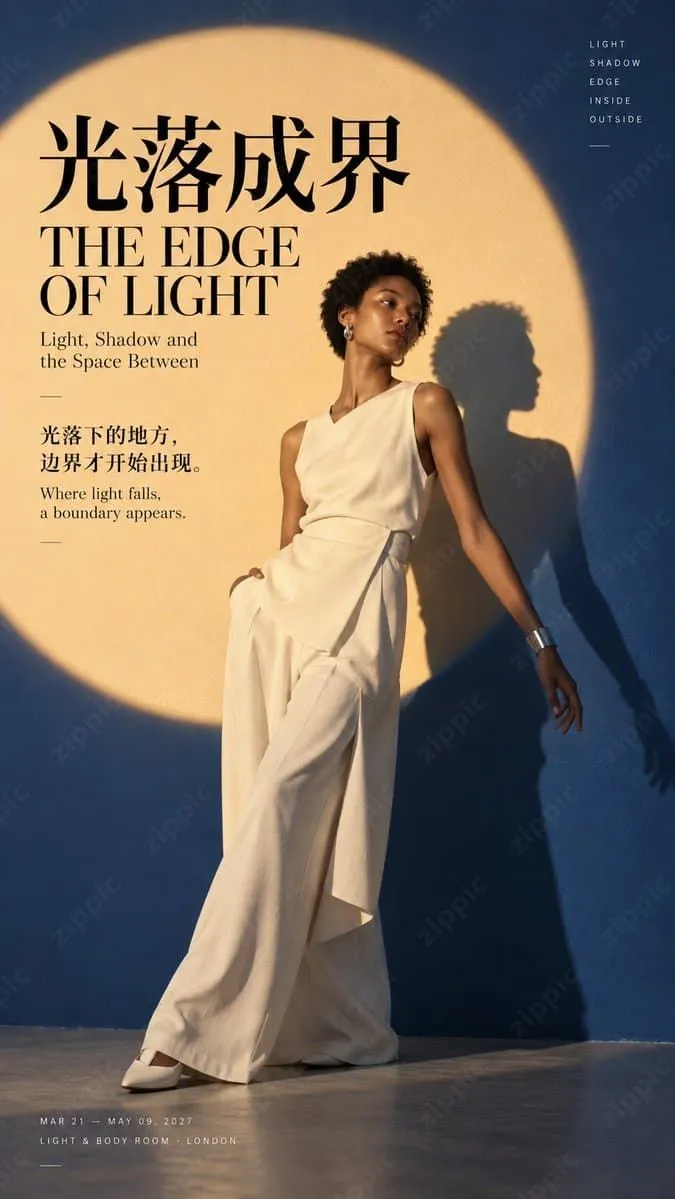
1. Light Becomes a Boundary: A Circular Light Field Divides the Character and Shadow
Use a large circular light field as the main boundary of the composition, placing half of the character in the light and half in the shadow, or allowing the shadow to be precisely divided by the light field. This approach is ideal for expressing “boundaries,” “inside and outside,” and “light-and-shadow narratives.” It has strong visual impact and pairs easily with sophisticated negative space.
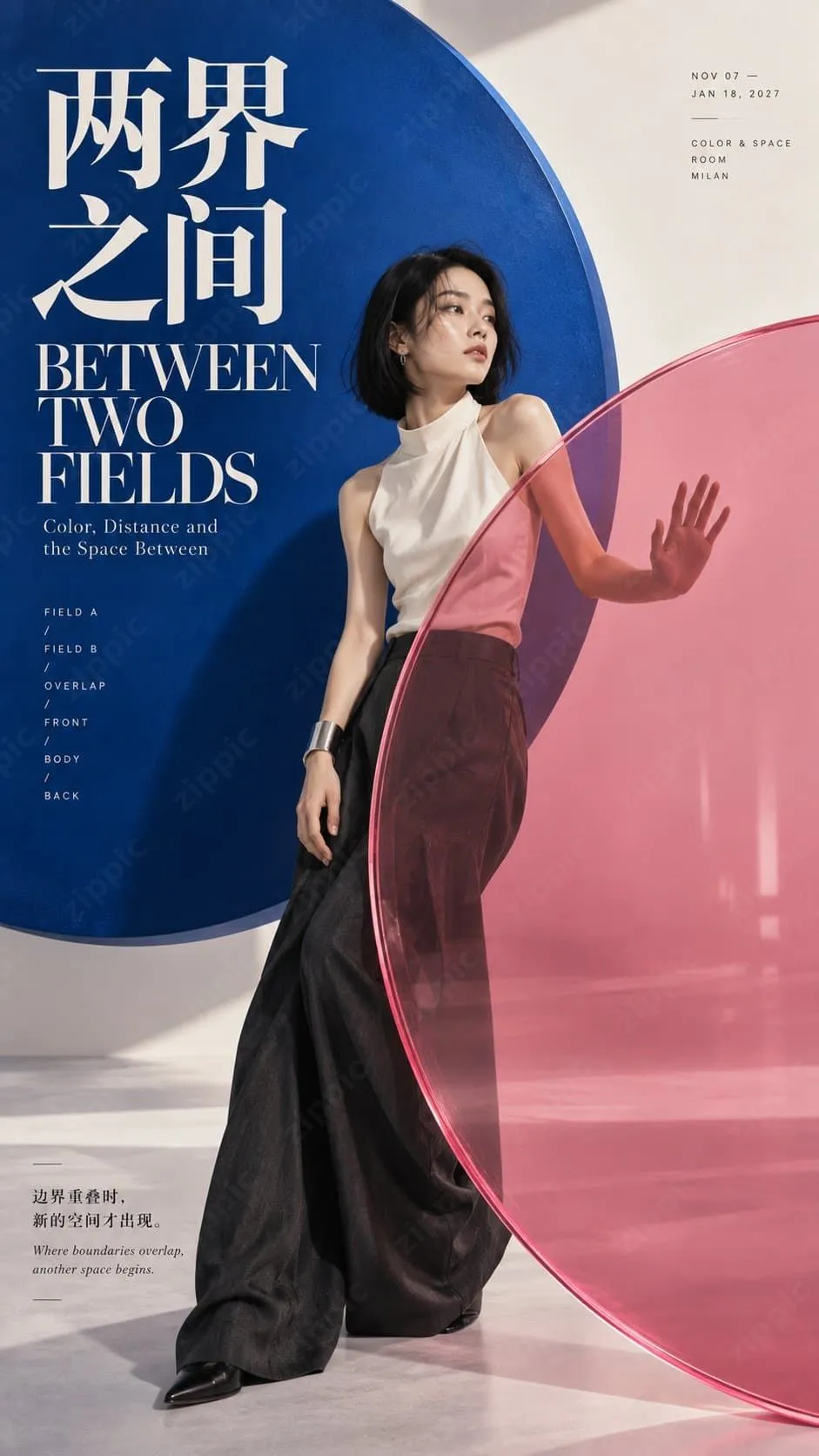
2. Between Two Realms: Transparent Overlapping Circles Create Spatial Depth
Place two semi-transparent colored circles in front of and behind the character, allowing them to overlap with and obscure parts of the body. The character can reach out to touch or pass through the transparent circles, creating the feeling that “space is being redefined.” Color contrast and transparency are key.
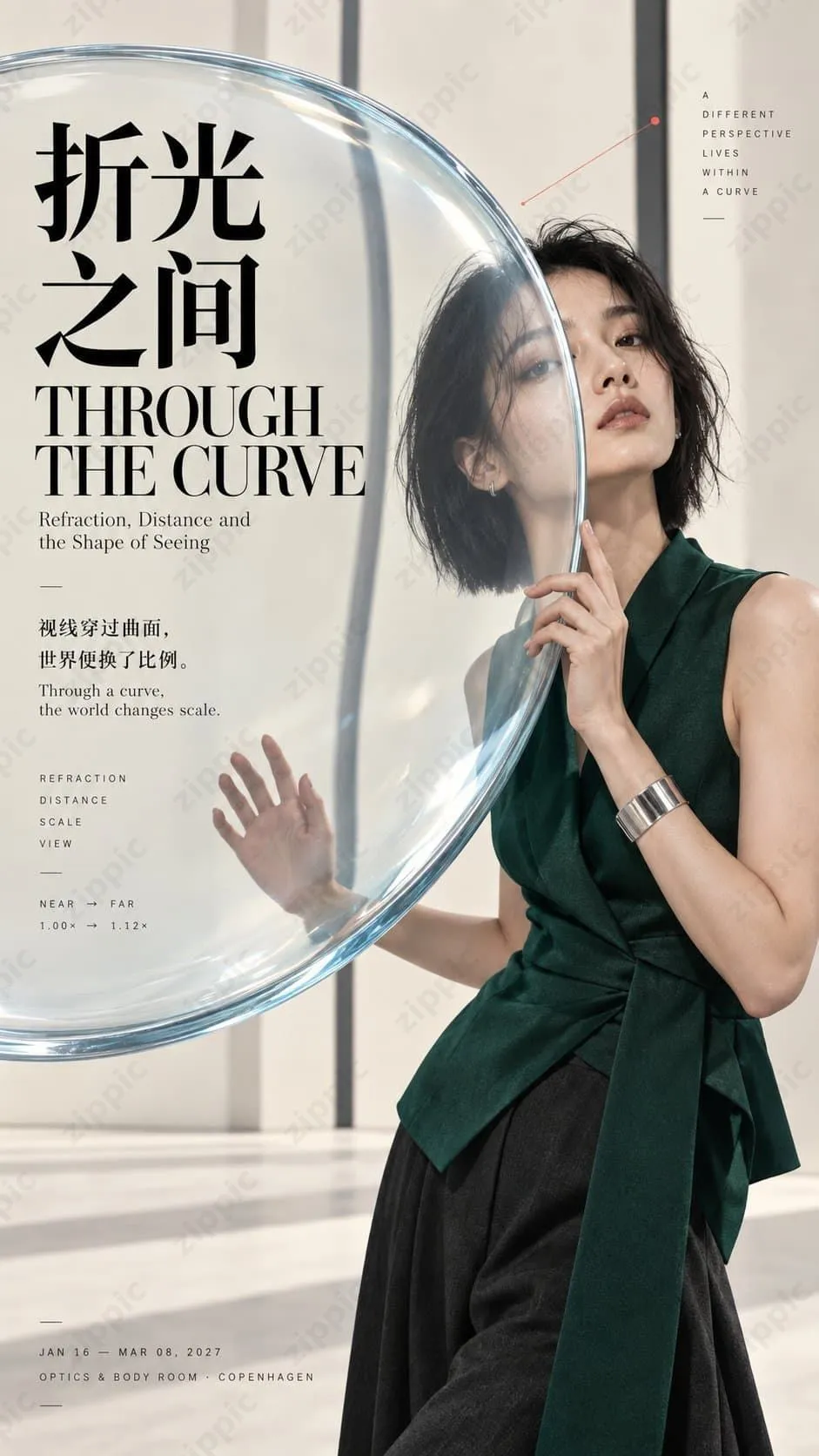
3. Between Refractions: A Lens Changes the Character’s Visual Proportions
Integrate a convex lens or optical glass element into the composition to subtly alter the proportions of part of the character or the perspective of the background. Emphasize realistic physical refraction logic, avoid exaggerated distortion, and maintain an overall photographic sense of realism.
4. Another Version of Me: A Circular Mirror Reveals a Different Perspective
Use a circular mirror or reflective material to show the character from another angle or reveal a partial reflection. The reflection must preserve the character’s identity while creating narrative tension through “dual observation.”
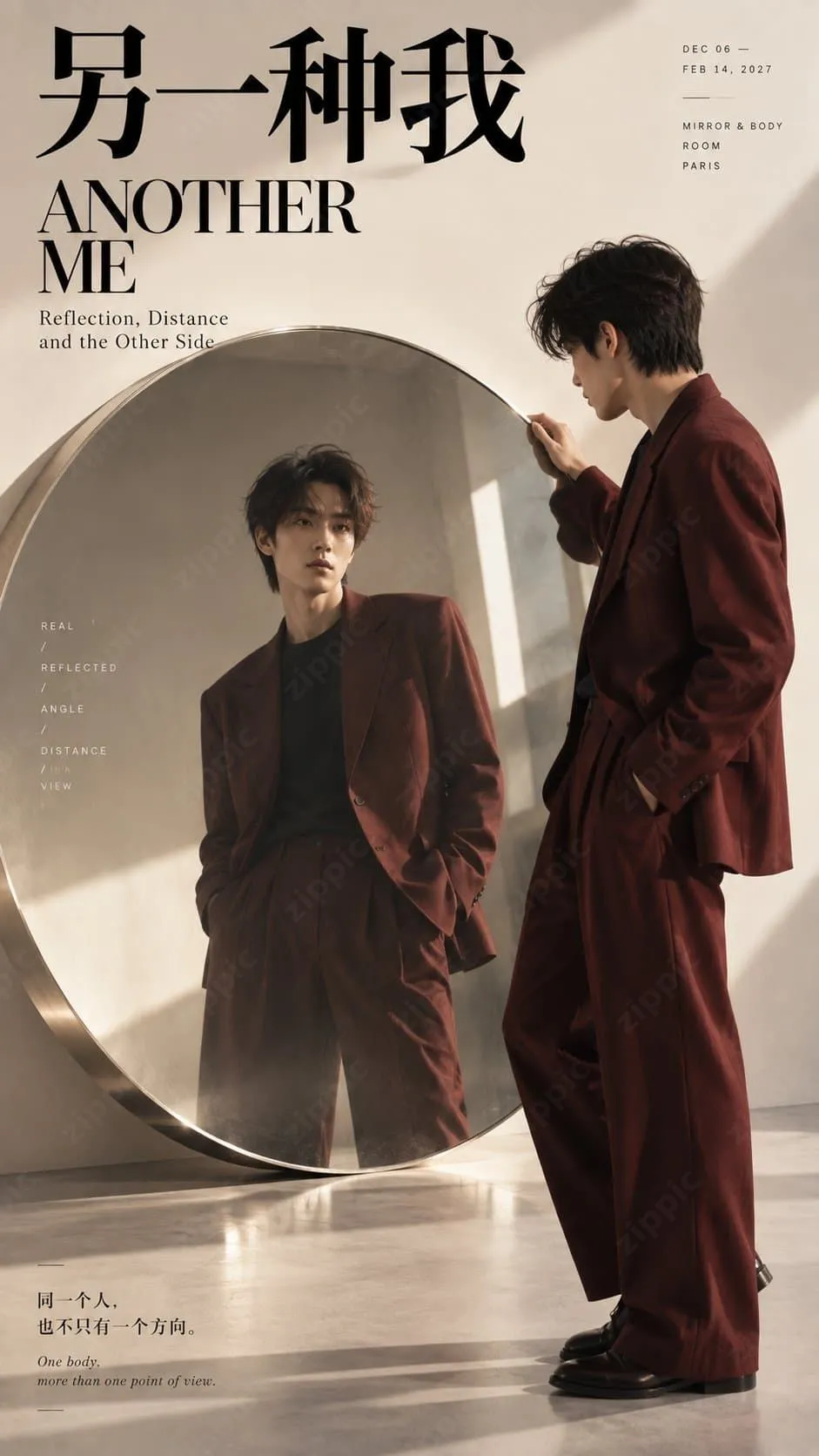
The shared core principle behind these techniques is: the circle is not background decoration but a participant in the space. The character must genuinely enter the circular structure, with the face, hands, body, or shadow forming a clear relationship with the circular edge. The inside and outside of the circle should differ distinctly in color, lighting, transparency, or scale.
Reusable High-Quality Images 2.5 Prompt Template
The following is a prompt framework validated through practical use, designed specifically for vertical 9:16 character Editorial posters:
【主题】:[填写主题]
【人物】:[性别 / 年龄感 / 穿搭 / 姿态]
【圆形机制】:[圆形光域 / 透明双圆 / 凸透镜 / 圆镜 / 其他]
【空间变化】:[切割 / 叠色 / 折射 / 反射 / 放大 / 遮挡]
【主色】:[背景色 + 圆域色 + 人物强调色]
【标题】:[中文 / 英文标题]

生成一张 9:16 竖版高质量人物 Editorial Poster,以“大尺度圆形视觉场 + 人物空间互动”为核心构图。

圆形不能只是人物背后的装饰,而要真正改变画面空间:可以通过圆形光域切开人物与影子;通过前后透明圆叠出新的颜色与空间层次;通过凸透镜改变人物和背景的视觉比例;通过圆镜形成真实反射和不同观察视角。

人物必须真正进入圆形结构,让脸、手、身体或影子与圆边发生穿插、遮挡、折射或跨界关系。圆内与圆外需要在颜色、光线、透明度、比例或视角上产生明确差异,让观众一眼看出“圆正在改变空间”。

整体采用真实高级人物摄影 + Contemporary Editorial Design + Fashion Magazine Poster 风格。使用清楚的大色块、现代高对比中文 Typography、优雅 Serif 英文和少量主题相关小字,保留约 20% 有效留白。

所有光影、透明、折射和镜像都遵循真实物理逻辑;人物皮肤、头发和服装自然真实,不要 CGI 感。透明材质干净通透,镜面反射保持同一人物身份,透镜只做克制自然的比例变化。

最终缩略图状态下仍能一眼看到:人物 + 大圆 + 明确的空间变化。

避免普通背景贴圆、PPT 感、科技 HUD、霓虹圆环、夸张变形、错误镜像、无意义小字、Logo、二维码、编号和版权标识。
Usage suggestions:
- Fix the circular mechanism and spatial change first, then fine-tune the character and colors.
- After generation, check whether the thumbnail is immediately readable.
- During multiple rounds of iteration, focus on adjusting “the degree of interaction between the circle and the character” rather than adding decorative elements.
Practical Tips: How to Improve Success Rate and Professional Quality
- Prioritize physical realism: Lighting, refraction, and reflection must follow intuitive physical rules; otherwise, the result can easily look like low-quality CGI.
- Negative space and typography are equally important: Approximately 20% effective negative space combined with clear bilingual Chinese-English copy can greatly enhance the magazine-cover feel.
- Avoid excessive layering: One main circular mechanism is sufficient; multiple circles can easily create confusion.
- Suitable applications: Character posters, fashion Editorials, brand visuals, magazine covers, and key visuals for art exhibitions.
- Iterate continuously: Run the same prompt several times and select the version with the most natural interaction for local optimization.
Don’t Forget to Optimize Image File Size After Generation
High-resolution AI-generated logos are often large in file size, and uploading them directly to websites, books, e-commerce product pages, or social media can slow down loading. We recommend the free online image compression tool https://zippic.app.
Its core advantages are well suited to this use case:
All processing takes place locally in the browser. Images are not uploaded to a server, providing better privacy and security.
Supports JPG, PNG, WebP, GIF, AVIF, and other formats.
- High compression rates while preserving image quality as much as possible
- Supports batch processing and is easy to use—just drag and drop
- No registration or login required
Conclusion
Circular framing is not merely a decorative technique. It is an effective way to enhance visual storytelling and professionalism through spatial interaction. With modern AI image tools such as Images 2.5, as long as you understand the principle of “letting the circle genuinely change the space” and combine it with structured prompts, anyone can quickly create character posters approaching a commercial level.