Many websites still use large JPEG and PNG images. They load slowly, consume more bandwidth, and make it difficult to improve PageSpeed scores. WebP and AVIF can reduce file sizes by 30% to 80%, often with little visible difference in image quality. However, many people either convert images manually one at a time or install plugins and use cloud services, which is inconvenient and raises concerns about uploading images.
zippic.app is a free tool that runs entirely in your browser. Your images are not uploaded to a server, so you can compress and convert them locally. Just drag them in to get started. There are no usage limits and no file size limits.
Why Images Still Hold Websites Back
Although WordPress supports lazy loading and responsive images, it still does not automatically handle image formats. Large photos straight from cameras, design assets, and product detail images can quickly accumulate and take up a lot of space. Most performance plugins focus on caching and do not handle format conversion. The result is:
- Slow loading on mobile devices
- Low Core Web Vitals scores
- High bandwidth costs
Switching to WebP or AVIF can significantly alleviate these problems.
A Quick Word on WebP and AVIF
WebP has excellent browser compatibility and is typically 20% to 30% smaller than JPEG or PNG. AVIF offers slightly higher compression efficiency, especially for high-resolution images. Both formats have sufficient browser support, so there is little reason to hesitate about using them today.
Why Common Approaches Are Not Very Convenient
Converting images one at a time becomes overwhelming when there are many files. Installing a collection of plugins can be cumbersome to configure and may sometimes cause conflicts. Cloud-based compression tools often impose free-tier limits, and they require you to upload images, which can feel unsettling when working with sensitive content.
zippic Makes It Easier
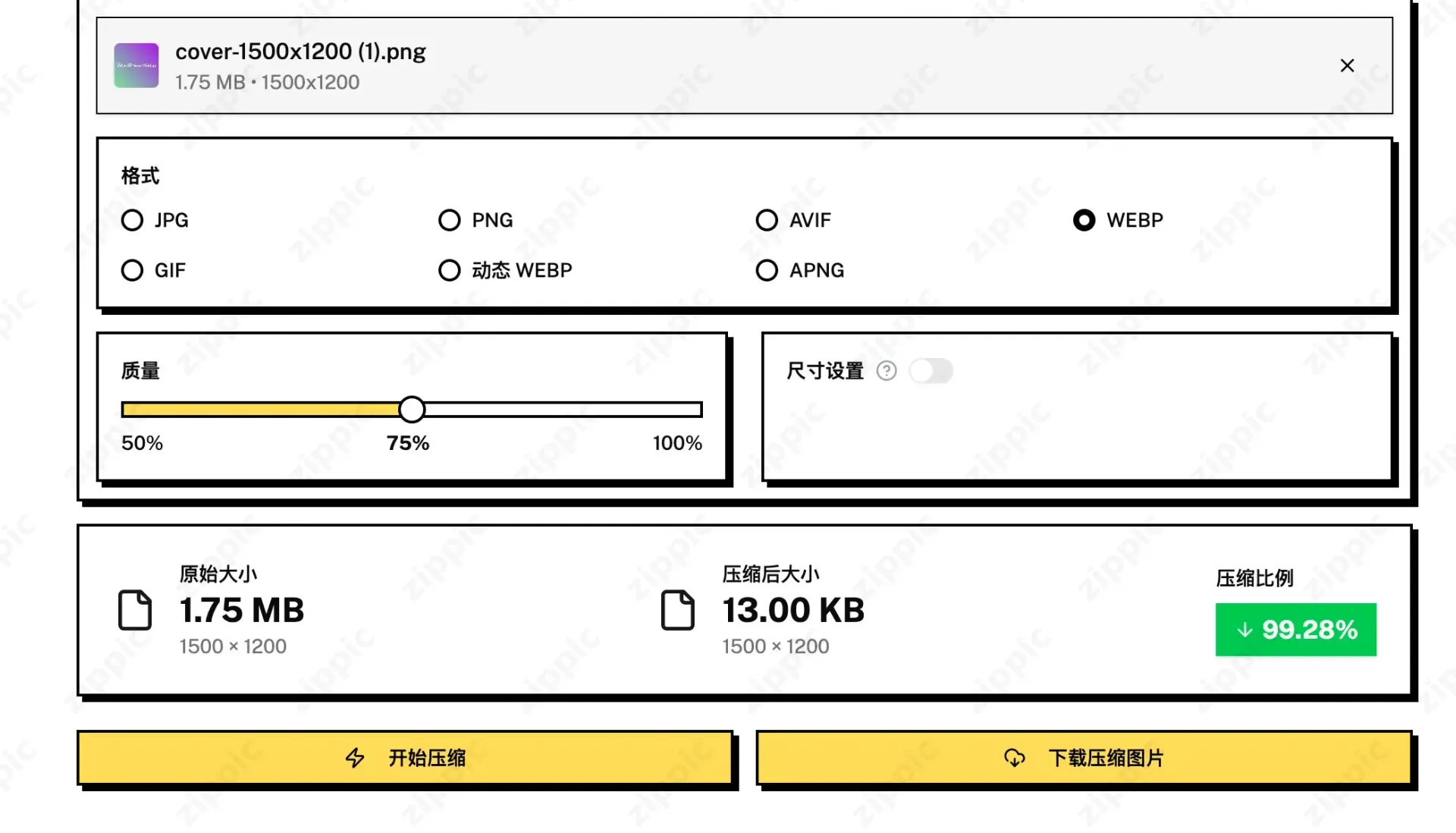
Open https://zippic.app (Chinese version: https://zippic.app/zh), drag your images into the tool, choose an output format—WebP or AVIF—and wait for the local processing to finish. Then download the results.
- Your images stay on your computer and are never uploaded
- Compress as many images as you like, with no quantity or size limits
- Supports common formats and can convert them directly to WebP / AVIF
- No registration or login required
Once processing is complete, you can upload the optimized images normally to the WordPress media library, an e-commerce backend, or social media. The website receives images that have already been optimized, so no additional work is required.
In some cases, the reduction can exceed 90%.
How to Use It in Practice
Compress your blog images before publishing. Your pages will feel much faster.
For e-commerce sites, process product images and detail-page images in batches. Faster loading can also help improve conversions.
If you build landing pages or client websites, convert all assets to WebP/AVIF to reduce the overall file size significantly.
After compression, compare the file sizes before and after. In most cases, the reduction is substantial, while the difference in image quality is barely noticeable.
Frequently Asked Questions
Do I need to change my upload workflow? No. Just compress the images before uploading them.
Will WordPress convert image formats automatically? No. WordPress supports displaying these formats, but it does not automatically convert images during upload.
Should I choose WebP or AVIF? Either works. AVIF is often slightly smaller, while WebP offers more reliable compatibility. zippic supports both.
Will the images look noticeably blurry? With normal settings, the difference is generally difficult to notice.
Are there free usage limits? No. It is completely free.
If you need it, give it a try at https://zippic.app
Drag in a few of your own images and see how much space you can save. You will be impressed.